

Two Critical PHP Flaws Could Hand Attackers Your Web Servers. Here’s How to Find, Mitigate, and Patch PHP2Shell Now

Last updated on: November 11, 2026
Table of Contents
- Whats at Risk
- The Two Vulnerabilities
- Affected Deployments
- PHP2Shell by the Numbers: Nearly All PHP Installations Are Exposed
- Fixed Versions and Upgrade Guidance
- How Qualys Can Help
- How to Safely Validate the PHP2Shell Exploit Path on Internet-Facing Assets
- Technical Appendix for Security Teams
- Connect Your AI Assistant to Qualys in Three Steps
Executive Summary
PHP2Shell refers to two critical vulnerabilities (CVE-2026-109618 and CVE-2026-109619), each with a CVSS v4.0 score of 9.2, that can allow unauthenticated remote code execution on PHP installations serving web requests. Researchers have also demonstrated unauthenticated disclosure of PHP worker memory, which can expose passwords, authentication tokens, and API keys. Cloudflare has already reported attack traffic, including attempts to evade its protections. Updating is the only complete fix: prioritize internet-facing deployments, starting with Apache mod_php, and assign an owner and remediation deadline to every system awaiting an update. This blog covers the fixed versions, PHP’s temporary mitigations, and how Qualys helps you discover exposure, mitigate risk before you can patch, and validate remediation.
What’s at Risk
PHP has released security updates for two critical vulnerabilities that can allow unauthenticated remote code execution. Apache mod_php deployments warrant immediate attention: PHP reports a demonstrated exploit that can trigger before application code runs.
The vulnerabilities, CVE-2026-109618 and CVE-2026-109619, each carry a CVSS v4.0 score of 9.2. Cloudflare has already reported attack traffic targeting these vulnerabilities, including attempts to evade its protections.
PHP identifies installations serving web requests as at risk, including PHP-FPM, Apache mod_php, php-cgi, FrankenPHP, and LiteSpeed. Exploitability varies by configuration and application behavior.
Watch: PHP2Shell in 90 seconds. Understand the risk, the fix, and how Qualys helps.
Missed the PHP2Shell Emergency Briefing? Watch the on-demand briefing and demo to see how Qualys customers can quickly mitigate this threat.
Not a Qualys customer? Access Qualys’ free PHP2Shell mitigation service to help protect your environment against this threat.
The Two Vulnerabilities
Both flaws involve PHP’s handling of memory and internal request state.
- CVE-2026-109618 — Out-of-memory corruption: When an out-of-memory error interrupts a vulnerable operation, PHP leaves request data partially initialized. Cleanup routines then process that invalid state, creating a path to remote code execution.
- CVE-2026-109619 — Stale global state: PHP retains references to request data after its backing memory has been freed. A later request handled by the same worker accesses those stale references before initialization resets them, triggering a use-after-free. Researchers have demonstrated remote code execution through this sequence.
Affected Deployments
While Apache mod_php is the most urgent priority, it is not the only deployment at risk. PHP-FPM also requires patching. Its startup behavior blocks a specific out-of-memory attack path, but PHP has validated session-lifecycle remote code execution against FPM under suitable application conditions.
Beyond code execution, researchers have also demonstrated unauthenticated disclosure of PHP worker memory. Exposed memory can contain passwords, authentication tokens, and API keys.
For root causes, CVSS vectors, and CWEs, see the Technical Appendix. Updating is the only complete fix, so the next step is to identify the fixed release for each PHP branch you run.
PHP2Shell by the Numbers: Nearly All PHP Installations Are Exposed
The Qualys Threat Research Unit analyzed anonymized data from more than 10,000 customers to measure exposure to PHP2Shell (CVE-2026-109618 and CVE-2026-109619). The results show how large the problem is.
We found 167 million PHP package installations, of which 156M have a known PHP version and 73% of them are on internet-facing assets. That puts them within reach of remote attackers.
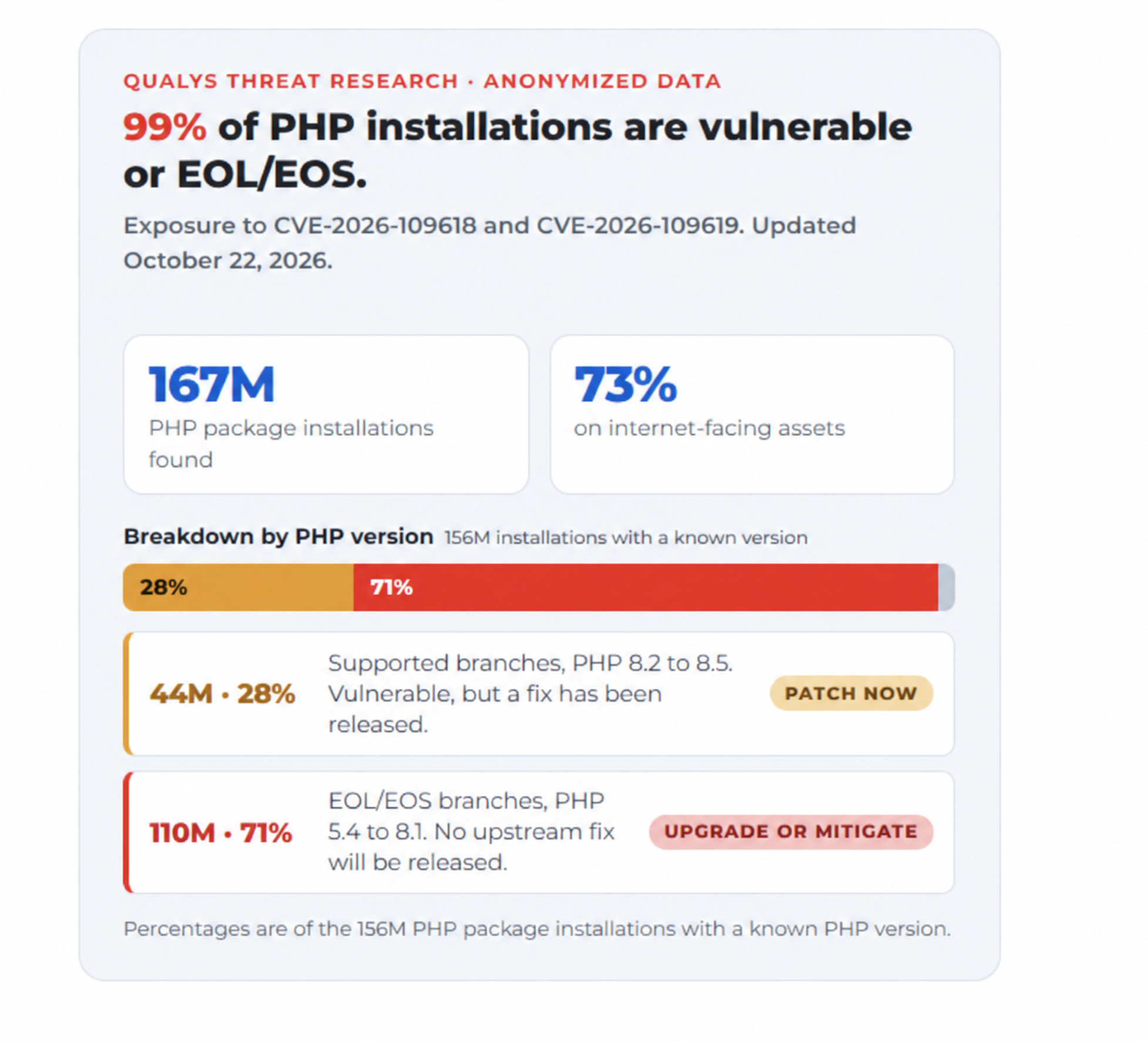
Among the 156 million installations with a known PHP version:
- 44 million (28%) run supported branches, PHP 8.2 to 8.5. A fix is available for these versions, but it has not been applied yet.
- 110 million (71%) run end-of-life or end-of-support versions of PHP, from 5.4 to 8.1. Most of these will never get a vendor patch, so upgrading to a supported branch is the only remedy.
- Only 199,000 were patched in the first 12 hours after disclosure.
The takeaway: Nearly all PHP installations are either vulnerable or running unsupported versions.
Fixed Versions and Upgrade Guidance
The following upstream releases address both vulnerabilities:
| PHP branch | Fixed version |
|---|---|
| PHP 8.5 | 8.5.12 |
| PHP 8.4 | 8.4.27 |
| PHP 8.3 | 8.3.36 |
| PHP 8.2 | 8.2.35 |
For distribution-managed installations, use your vendor’s advisory to identify the fixed package. Backported fixes may retain an older upstream version number.
PHP 8.1 and earlier remain outside regular upstream support. PHP has provided limited source backports for 7.4, 8.0, and 8.1. Organizations running those branches should obtain a fixed build from their distribution or support vendor, apply the appropriate source backport, or upgrade to a supported release.
When a fixed release cannot be deployed immediately, PHP recommends temporary measures to reduce exposure (see Temporary Mitigations Recommended by PHP in the Technical Appendix), and Qualys mitigation described below can also help. If a patched build cannot be deployed promptly, consider restricting public access or temporarily isolating the affected service while remediation is arranged. Patching, mitigating, and verifying all start with knowing where PHP runs in your environment.
How Qualys Can Help
Qualys helps you respond to PHP2Shell in three stages: discover and assess exposure, mitigate before you can patch, and remediate and validate.
1. Discover and Assess Exposure
The first step is knowing where PHP runs and which installations are vulnerable.
Inventory PHP Installations
Qualys customers can begin discovery with QID 45110 – PHP Server Detected, an Information Gathered (IG) check.
QID 45110 identifies PHP installations; it does not confirm vulnerability to either CVE. Use its results to identify systems for review, then validate each installation against the applicable PHP or vendor advisory.
Qualys CyberSecurity Asset Management (CSAM) can help teams inventory PHP installations, identify end-of-life software, and prioritize internet-facing assets for remediation. It shows every asset where PHP is installed, so teams can scope PHP2Shell remediation in minutes.
Run the following queries in CSAM > Inventory > Assets.
All assets with PHP installed
(software: ((name: "php")))Assets running end-of-life PHP (8.1 and earlier)
((software: (((name: "PHP") AND (version: (*..8.1))))))PHP on your most critical assets
((asset.criticalityScore: [4..*)) AND (software: (((name: "PHP") AND (version: (*..8.1))))))Use QID 45110 to establish your PHP discovery baseline, keep software inventory current, and configure InstaScan to cover the relevant assets. With the baseline in place, use the vulnerability detection QIDs below to assess PHP2Shell exposure and verify remediation.
Detection QIDs
Qualys released the following detection QIDs, which are now available. We will add distribution-specific detection QIDs to this blog as they are released.
| QID | Detection Title | VulnSigs Released Version |
|---|---|---|
| 389120 | F5 BIG-IP Hypertext Preprocessor (PHP) Vulnerabilities (K000163821) | VULNSIGS -2_6_728-3 |
| 6056531 | Red Hat Update for Hypertext Preprocessor (PHP):8.2 (RHSA-2026:87073) | VULNSIGS -2_6_728-2 |
| 364187 | Amazon Linux Security Advisory for php8.5 : ALAS2023-2026-3304 | VULNSIGS -2_6_728-3 |
| 364186 | Amazon Linux Security Advisory for php8.2 : ALAS2023-2026-3301 | VULNSIGS -2_6_728-3 |
| 364182 | Amazon Linux Security Advisory for php8.4 : ALAS2023-2026-3303 | VULNSIGS -2_6_728-3 |
| 364181 | Amazon Linux Security Advisory for php8.3 : ALAS2023-2026-3302 | VULNSIGS -2_6_728-3 |
| 364180 | Amazon Linux Security Advisory for Hypertext Preprocessor (PHP) : ALAS2PHP8.2-2026-015 | VULNSIGS -2_6_728-2 |
| 6056527 | Red Hat Security Advisory for CVE-2026-109618 (Unfixed Vulnerability) | VULNSIGS-2.6.728-2 |
| 964549 | Rocky Linux Security Update for php8.4 (RLSA-2026:87071) | VULNSIGS -2_6_728-2 |
| 964548 | Rocky Linux Security Update for Hypertext Preprocessor (PHP):8.2 (RLSA-2026:87072) | VULNSIGS-2.6.728-2 |
| 964543 | Rocky Linux Security Update for Hypertext Preprocessor (PHP):8.3 (RLSA-2026:87079) | VULNSIGS -2_6_728-2 |
| 964542 | Rocky Linux Security Update for Hypertext Preprocessor (PHP):7.4 (RLSA-2026:87080) | VULNSIGS-2.6.728-2 |
| 964520 | Rocky Linux Security Update for Hypertext Preprocessor (PHP) (RLSA-2026:87070) | VULNSIGS -2_6_728-2 |
| 964518 | Rocky Linux Security Update for Hypertext Preprocessor (PHP) (RLSA-2026:87151) | VULNSIGS-2.6.728-2 |
| 6056525 | Red Hat Update for Hypertext Preprocessor (PHP):8.3 (RHSA-2026:87079) | VULNSIGS -2_6_728-2 |
| 6056524 | Red Hat Update for Hypertext Preprocessor (PHP) (RHSA-2026:87151) | VULNSIGS-2.6.728-2 |
| 6056523 | Red Hat Update for Hypertext Preprocessor (PHP) (RHSA-2026:87070) | VULNSIGS -2_6_728-2 |
| 6056522 | Red Hat Update for Hypertext Preprocessor (PHP):8.2 (RHSA-2026:87072) | VULNSIGS-2.6.728-2 |
| 6056518 | Red Hat Update for php8.4 (RHSA-2026:87071) | VULNSIGS -2_6_728-2 |
| 765979 | SUSE Enterprise Linux Security Update for php8 (SUSE-SU-2026:4844-1) | VULNSIGS-2.6.728-2 |
| 765976 | SUSE Enterprise Linux Security Update for php8 (SUSE-SU-2026:4843-1) | VULNSIGS -2_6_728-2 |
| 6297246 | Debian Security Update for php8.2,php8.4 (CVE-2026-109618) | VULNSIGS-2.6.728-2 |
| 520310 | PHP Remote Code Execution (RCE) Vulnerabilities (PHP2Shell) (CVE-2026-109618,CVE-2026-109619) | VULNSIGS -2_6_728-2 |
| 6101336 | Arch Linux Security Update for php (ASA-202610-1) | VULNSIGS-2.6.726-3 |
| 6101335 | Arch Linux Security Update for php-legacy (ASA-202610-2) | VULNSIGS-2.6.726-3 |
| 6567434 | Alpine Linux 3.24 Security Update for php85 | VULNSIGS-2.6.726-3 |
| 6567433 | Alpine Linux 3.24 Security Update for php84 | VULNSIGS-2.6.726-3 |
| 6567432 | Alpine Linux 3.24 Security Update for php83 | VULNSIGS-2.6.726-3 |
| 6056502 | Red Hat Update for Hypertext Preprocessor (PHP):7.4 (RHSA-2026:87080) | VULNSIGS-2.6.726-3 |
| 711202 | Gentoo Linux Hypertext Preprocessor (PHP) Multiple Vulnerabilities (GLSA 202610-02) | VULNSIGS-2.6.726-3 |
| 290606 | Fedora Security Update for Hypertext Preprocessor (PHP) (FEDORA-2026-a9eba4bbc3) | VULNSIGS-2.6.726-3 |
| 6877311 | Ubuntu Security Notification for Hypertext Preprocessor (PHP) Vulnerabilities (USN-8948-2) | VULNSIGS-2.6.726-3 |
| 6877310 | Ubuntu Security Notification for Hypertext Preprocessor (PHP) Vulnerabilities (USN-8948-1) | VULNSIGS-2.6.726-3 |
| 5019896 | PHP (Composer) Security Update for php-src (GHSA-w8hw-w9fx-j79w) | VULNSIGS-2.6.727-2 |
| 389102 | Hypertext Preprocessor (PHP) Multiple Security Vulnerabilities (PHP2Shell) | VULNSIGS-2.6.727-2 |
| 39033 | Hypertext Preprocessor (PHP) Multiple Security Vulnerabilities (PHP2Shell) (Unauthenticated) | VULNSIGS-2.6.727-2 |
| 39036 | Hypertext Preprocessor (PHP) Session Upload Progress Remote Code Execution Vulnerability (CVE-2026-115560) (Unauthenticated) | To be released soon |
| 389141 | Hypertext Preprocessor (PHP) Session Upload Progress Remote Code Execution Vulnerability (CVE-2026-115560) | To be released soon |
| 48394 | PHP Installation and Configuration Detected |
As distributions publish their own advisories, InstaScan helps you act on them without waiting for the next scheduled scan.
Detect Exposure the Moment Distributions Release Their Patches
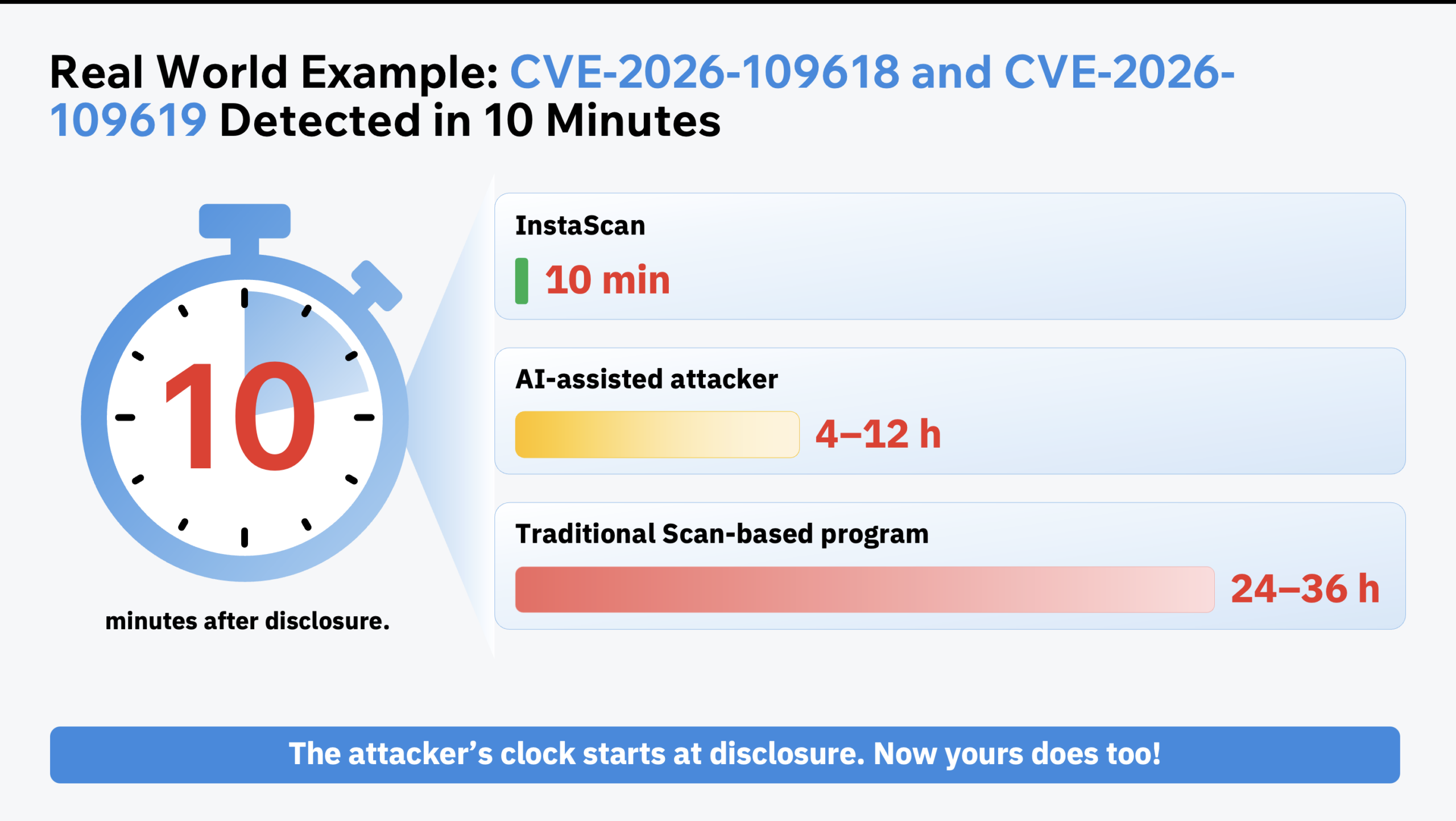
With Qualys InstaScan, powered by Agent Insta, new vendor advisories become actionable exposure findings using the software inventory your environment already reports. InstaScan continuously matches advisory intelligence against that inventory, surfacing findings for assets in scope, typically within minutes of advisory processing, without requiring a new scan. Your team can begin investigating and prioritizing remediation while the next scheduled scan is still hours away.
For PHP2Shell, this brings faster visibility as distribution-specific advisories become available. Supported advisory sources include Red Hat, Ubuntu, Debian, and Oracle Linux, helping teams respond across mixed Linux environments.

Package-level findings are only part of the picture, because PHP copies can also live outside standard locations.
How to Safely Validate the PHP2Shell Exploit Path on Internet-Facing Assets
Version matching identifies PHP hosts running unfixed releases, but not which are exploitable right now. Security teams need to know where the entry point is actually open. Qualys Enterprise TruRisk Management (ETM) uses TruConfirm to safely validate exploitability on live production assets without disruption.
How it works:
- Verify the target. Confirm the server runs PHP before proceeding.
- Send a benign probe. A carefully crafted upload request mimics the attacker’s initial move without creating files, executing code, or applying memory pressure.
- Confirm exposure. PHP startup warnings indicate the php2shell entry point is reachable and the recommended mitigation,
session.upload_progress.enabled=0, is absent.
Confirmed exposures receive an amplified TruRisk score and move up the remediation queue with supporting evidence. ETM combines exploit validation with version-based detection to show both whether the entry point is exposed and whether the PHP build is patched.
Lastly, remediate and verify. Upgrade PHP and restart all workers, or disable session upload progress if unused. Revalidate to confirm the entry point is no longer reachable and provide evidence for auditors. Safely validate the PHP2Shell exploit path across your internet-facing assets with TruConfirm in ETM today.

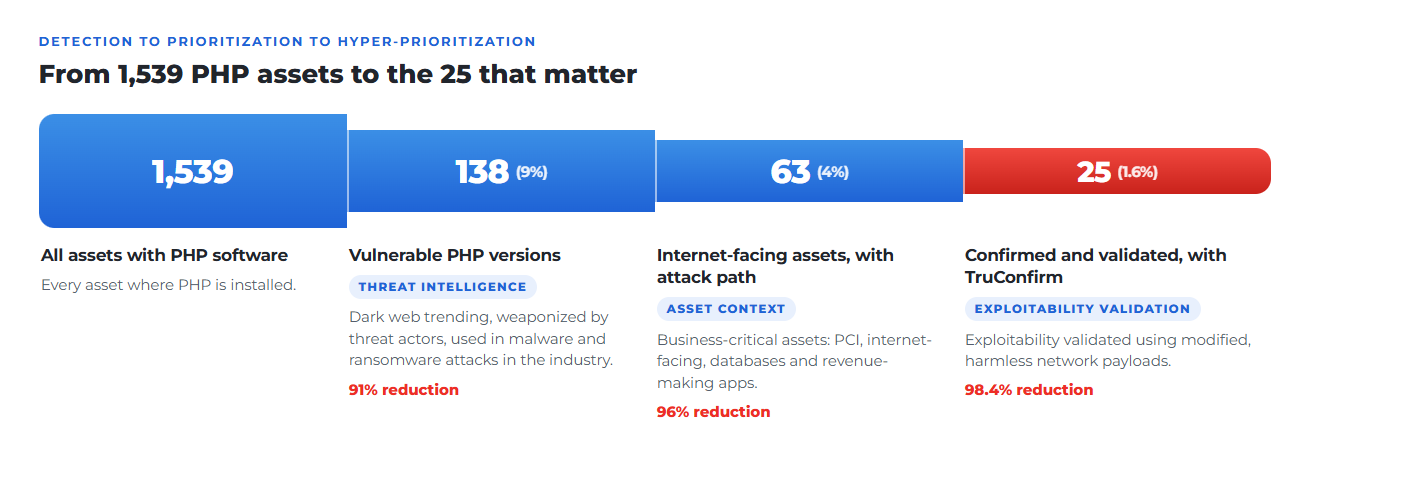
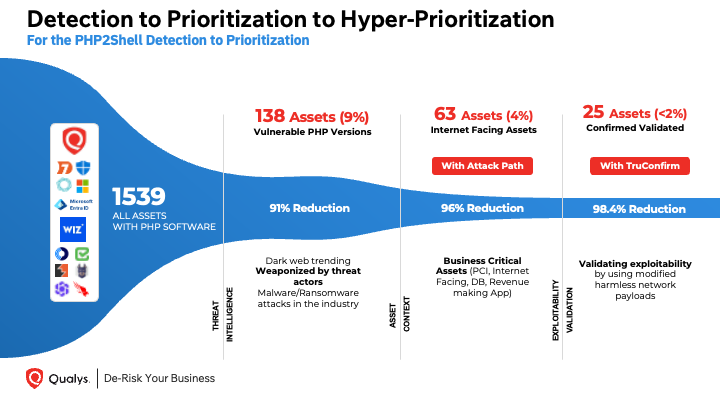
In a real customer environment, 1,539 assets were running PHP, but only 25 were confirmed to be exploitable. This highlights the power of TruConfirm, the AI-driven exploit validation in Qualys ETM. Instead of providing your team with a lengthy list of 1,539 assets to investigate, TruConfirm safely identifies which ones attackers can actually reach and exploit, all while operating on live production assets without creating files, executing code, or disrupting operations. By combining this validation with threat intelligence and asset context, TruConfirm helps your team move from detection to hyper-prioritization, so they can focus on the less than 2% of assets that matter most, backed by solid evidence for every decision.
A Caution Before You Test: Public PoCs Are Demonstrations, Not Validation Tools
Since disclosure, PHP2Shell proof-of-concept scripts have spread quickly on GitHub. They are useful for understanding the research. However, they are not a safe way to check whether a production server is exposed, and running one against an internet-facing asset can cause exactly the kind of disruption you are trying to prevent. A PoC run against a live target typically does four things:
- It ties up PHP workers. Some widely shared scripts hold a single upload open for close to a minute. Others send oversized requests to force an out-of-memory condition. Against a small worker pool or a busy server, either can leave legitimate requests waiting while the test runs.
- It writes attacker-controlled data to disk. The technique records client-supplied upload data into a real session file on the server. In the public scripts that data carries PHP code. The demonstration payload is harmless on its own, but the staging mechanism is identical to what an attacker would use, and an interrupted run can leave that file behind.
- It walks the vulnerable code path. PHP2Shell is a memory-corruption vulnerability. A PoC demonstrates exploitability by triggering that corruption directly. On an unpatched build, that is the same condition that can take down a worker. These scripts were tuned to the researcher’s lab, not to your build, your traffic, or your uptime requirements.
- It may not be what it claims to be. High-profile vulnerabilities routinely attract look-alike exploit code. Treat any PoC as untrusted and check where it connects and what it writes, and never run it from a system with access to your environment.
PoCs have a place. Clone the asset into an isolated lab, snapshot it, and run them there. On production, validate without walking the vulnerable path at all. That is what the approach above is built for: TruConfirm confirms the entry point is reachable and that the recommended mitigation is absent, without creating files, executing code, or applying memory pressure. Keep in mind that to a WAF or SIEM, PoC traffic looks like an attack, and against systems you do not own it will be treated as one.
Find Vulnerable PHP Installations Beyond Standard Locations with Qualys Deep Scan
QID 389102 detects vulnerable PHP installed as managed software (via the OS package manager) through standard Cloud Agent VM scans. On Windows assets, enabling Qualys Deep Scan extends the same QID to detect unmanaged PHP binaries in custom or nonstandard locations.
Deep Scan identifies vulnerable PHP binaries in custom application folders, secondary drives, and other configured directories. Findings appear in VMDR with the full binary path, installed version, and recommended fixed version, giving security and IT teams the details needed to locate and remediate overlooked installations.
This additional visibility matters when multiple PHP copies exist for the same asset: updating the primary installation can leave other copies vulnerable. Customers can tailor inspection through directory inclusion and exclusion rules, scan schedules, and resource controls. Deep Scan is included with VMDR and is available on Windows assets running Cloud Agent 6.2 or later.
Identify Vulnerable PHP Across Cloud Images, Containers, and Serverless Workloads
PHP vulnerabilities can extend beyond traditional servers into cloud-native environments, including Amazon Machine Images (AMIs), container images, Kubernetes workloads, and serverless functions.
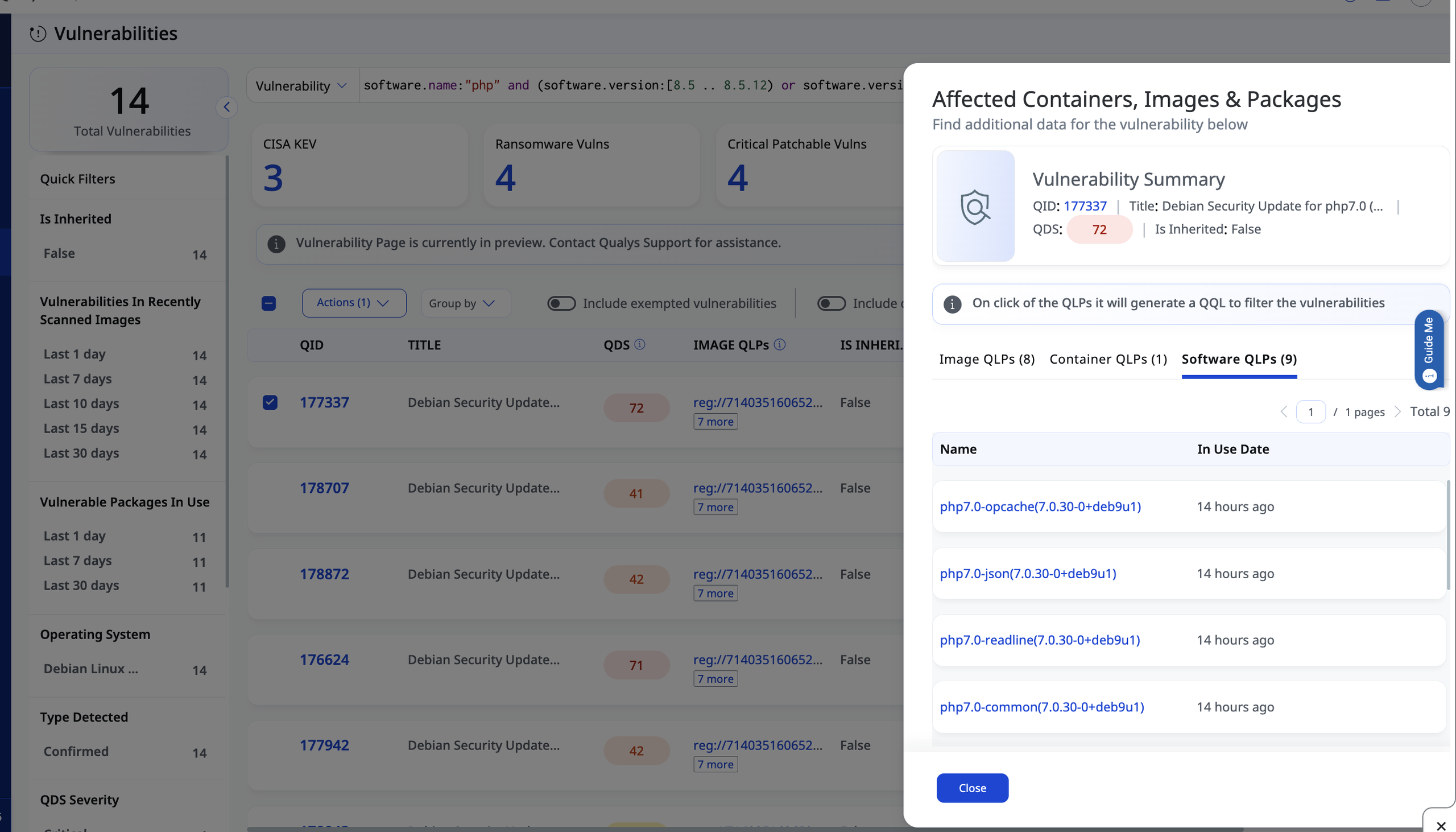
With Qualys TotalCloud and Container Security, organizations can identify vulnerable PHP components across AMIs, container registries, build artifacts, and deployed workloads. Qualys correlates container images with running containers, serverless and Kubernetes workloads, helping teams identify which vulnerable images are actively deployed in production rather than simply stored in a registry.
Go beyond package presence with Runtime Vulnerability Reachability. Using its eBPF-based Container Runtime Sensor, Qualys identifies vulnerable software packages observed in use within running containers and correlates this runtime evidence with vulnerability findings. Combined with internet exposure and workload context, this helps security teams prioritize PHP vulnerabilities affecting actively running applications.
This enables organizations to trace affected workloads back to their container images, update vulnerable dependencies, rebuild images, and redeploy patched workloads.
Respond to PHP2Shell Exposure Across Web Applications and APIs
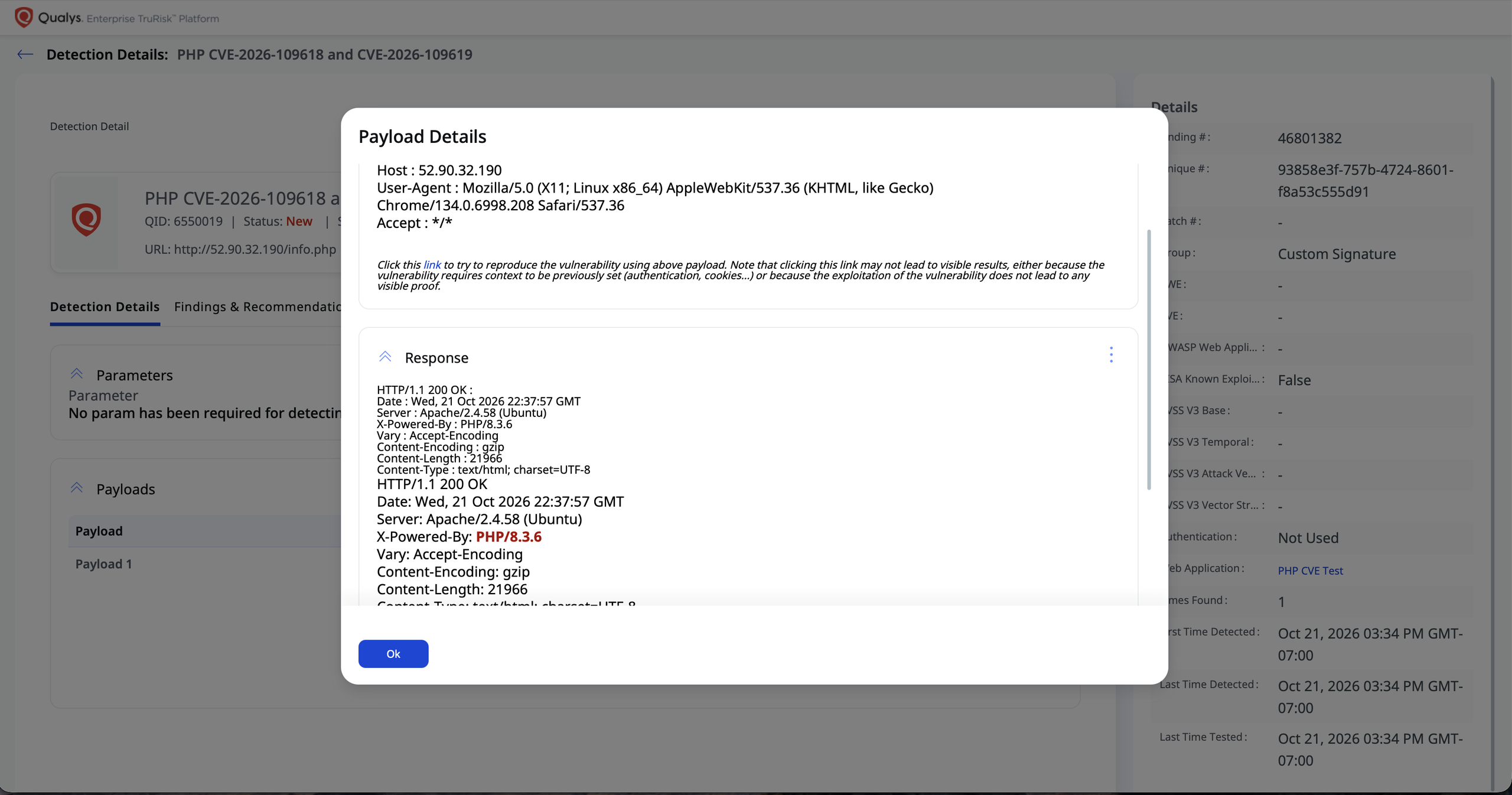
PHP2Shell (CVE-2026-109618 and CVE-2026-109619) affects the underlying PHP runtime. Web applications and APIs running on vulnerable PHP versions may be at risk of remote code execution.
Identifying vulnerable hosts is only part of the challenge. Security teams also need to determine which applications are internet-facing, where potential exposure exists, and which affected systems require immediate remediation.
Qualys TotalAppSec connects application-level exposure with infrastructure-level vulnerability intelligence, extending PHP exposure visibility beyond host-based detection to the web applications and APIs that attackers can reach.
Qualys answers three operational questions:
| Questions | Where the answers come from | What it tells you |
|---|---|---|
| What is exposed? | Application level (TotalAppSec) | Which web applications and APIs are exposed, and what PHP version information do they reveal? |
| What should we fix first? | Underlying infrastructure (VMDR + TotalCloud) | Which applications are running on vulnerable runtimes? |
| How do we know it is fixed? | Remediate + validate | Which exposed workloads need patching, and can we confirm the fix? |
Through application discovery and the identification of exposed PHP version information, TotalAppSec flags potentially affected applications, including those whose underlying runtimes may not be fully represented in host inventories. While exposed version information provides a useful indicator, confirming vulnerability requires validating the actual PHP runtime version and patch status.
By combining TotalAppSec’s application-level visibility with vulnerability findings from Qualys VMDR and TotalCloud, security teams can identify internet-facing applications that are affected by affected PHP runtimes and prioritize remediation based on exposure and risk.
Following remediation, teams can rescan applications with TotalAppSec to reassess externally visible PHP version information, while using VMDR and TotalCloud assessments to verify that the underlying PHP runtimes have been patched. This combined approach helps organizations move from identifying potential PHP2Shell exposure to prioritizing remediation and validating that affected workloads have been secured.
Customers can use the following QIDs to detect PHP2Shell exposure in web applications and APIs:
| QID | Detection Title | VulnSigs Released Version |
| 520310 | PHP Remote Code Execution (RCE) Vulnerability (PHP2Shell) (CVE-2026-109618, CVE-2026-109619) | VULNSIGS-2.6.728-2 |
| 533086 | PHP Remote Code Execution Vulnerability (PHP2Shell) (CVE-2026-109618, CVE-2026-109619) | VULNSIGS-2.6.728-8 |
| 520404 | PHP Session Upload Progress Enabled Remote Code Execution Vulnerability (CVE-2026-115560) | VULNSIGS-2.6.728-8 |
Fight Back Against PHP2Shell with Qualys
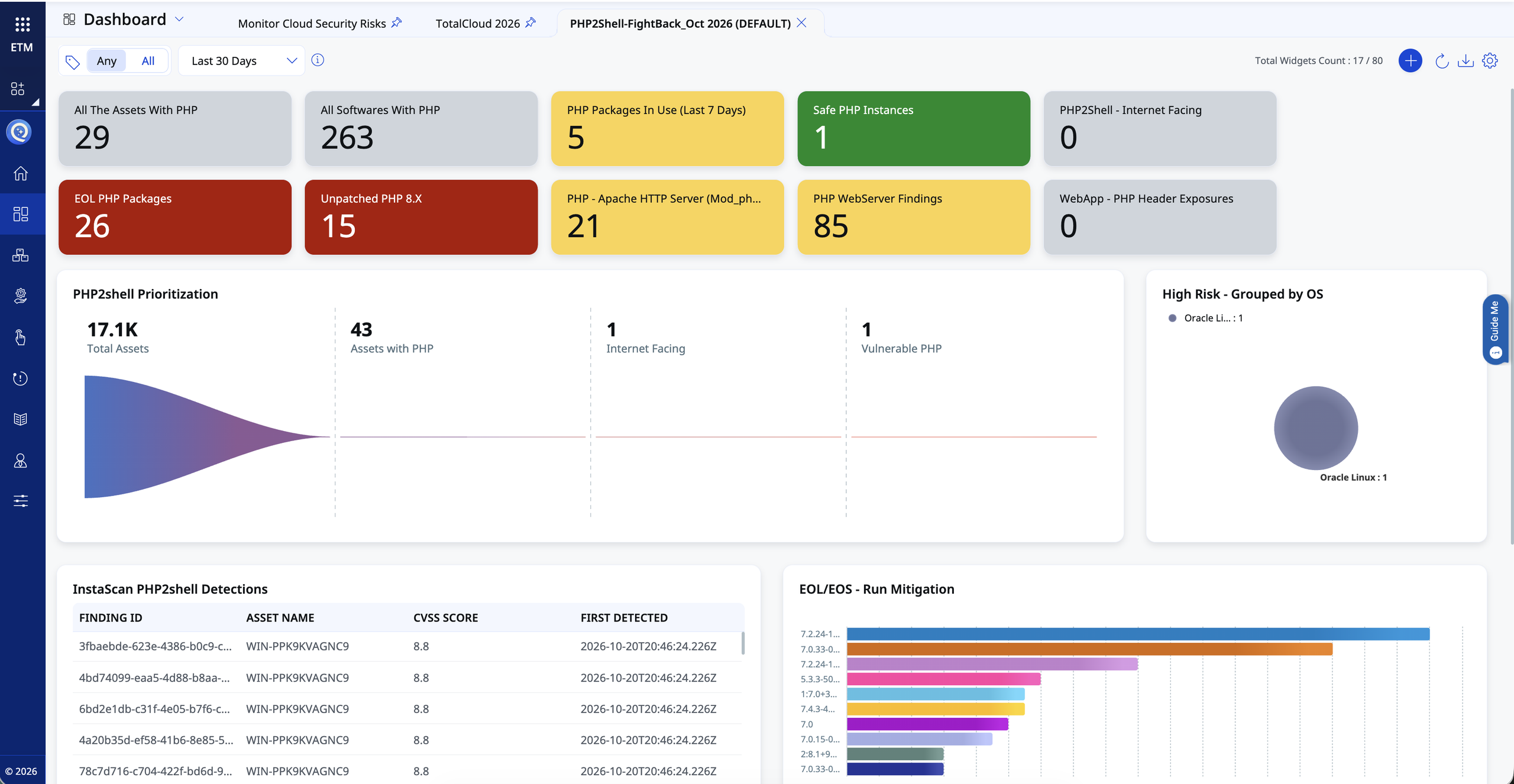
Our new PHP2Shell “Fightback” dashboard gives you one place to find every PHP instance in your environment, see which ones are actually at risk, and decide what to fix first.
Know Your Full PHP Footprint
- Every asset running PHP software, with detections from the past week
- Source-based discovery, so you can see how each instance was found
- Safe instances separated out, so you can focus on what needs attention
See Where the Real Risk Is
- Internet-facing instances and attack surface exposure
- End-of-life and unpatched PHP versions, with EOL/EOS breakouts
- Apache HTTP Server mod_php risk
- General web service and header exposures
Prioritize and Act Fast
- PHP2Shell prioritization, with high-risk assets grouped by OS
- InstaScan detections of PHP2Shell in under a day
- Detection age and current state (active, fixed, reopened) to track remediation progress
As new CVEs and patches roll out for each PHP version, we’ll keep tuning and updating the dashboard.
Download the PHP2Shell Fightback Dashboard today.
2. Mitigate Before You Can Patch
Qualys Mitigation available for CVE-2026-109618 and CVE-2026-109619
This mitigation follows PHP’s mitigation guidance, with additional insights from the Qualys Threat Research Unit (TRU).
This mitigation disables the PHP session upload-progress feature across every web-facing PHP runtime on the host and hardens the related session-handling configuration. This removes the vulnerable code path from execution without changing the application itself.
It is a configuration-level change applied to each affected PHP interpreter, and the PHP service must be restarted for it to take effect. The mitigation restarts the service automatically; if the logs show a restart is still required, you can restart the PHP service manually. After the restart, the effective configuration is verified to confirm the setting is active and not overridden elsewhere.
This is an interim risk-reduction measure that eliminates the flaw’s reachability.
Mitigation Details via Qualys Dashboards
Qualys mitigations have been available for more than 12 hours. Customers with vulnerable detections can see the following mitigation options on their dashboards.
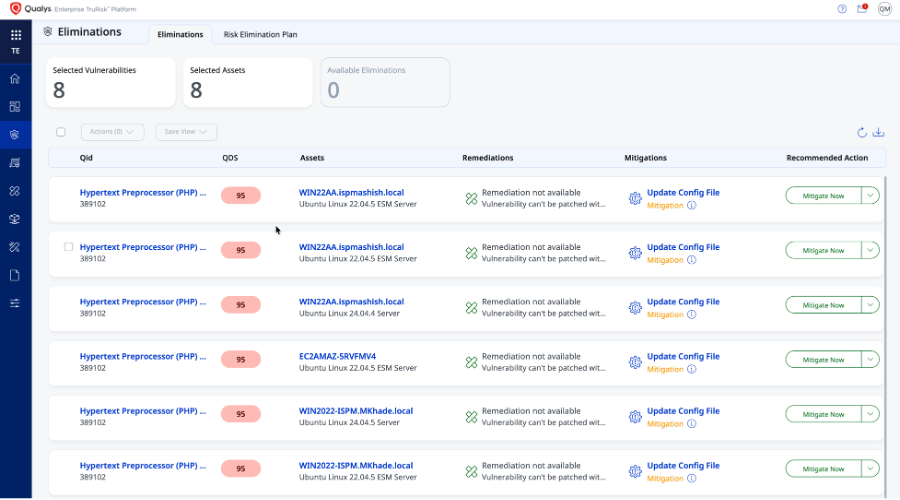
Select the “Mitigate Now” option on this familiar screen.
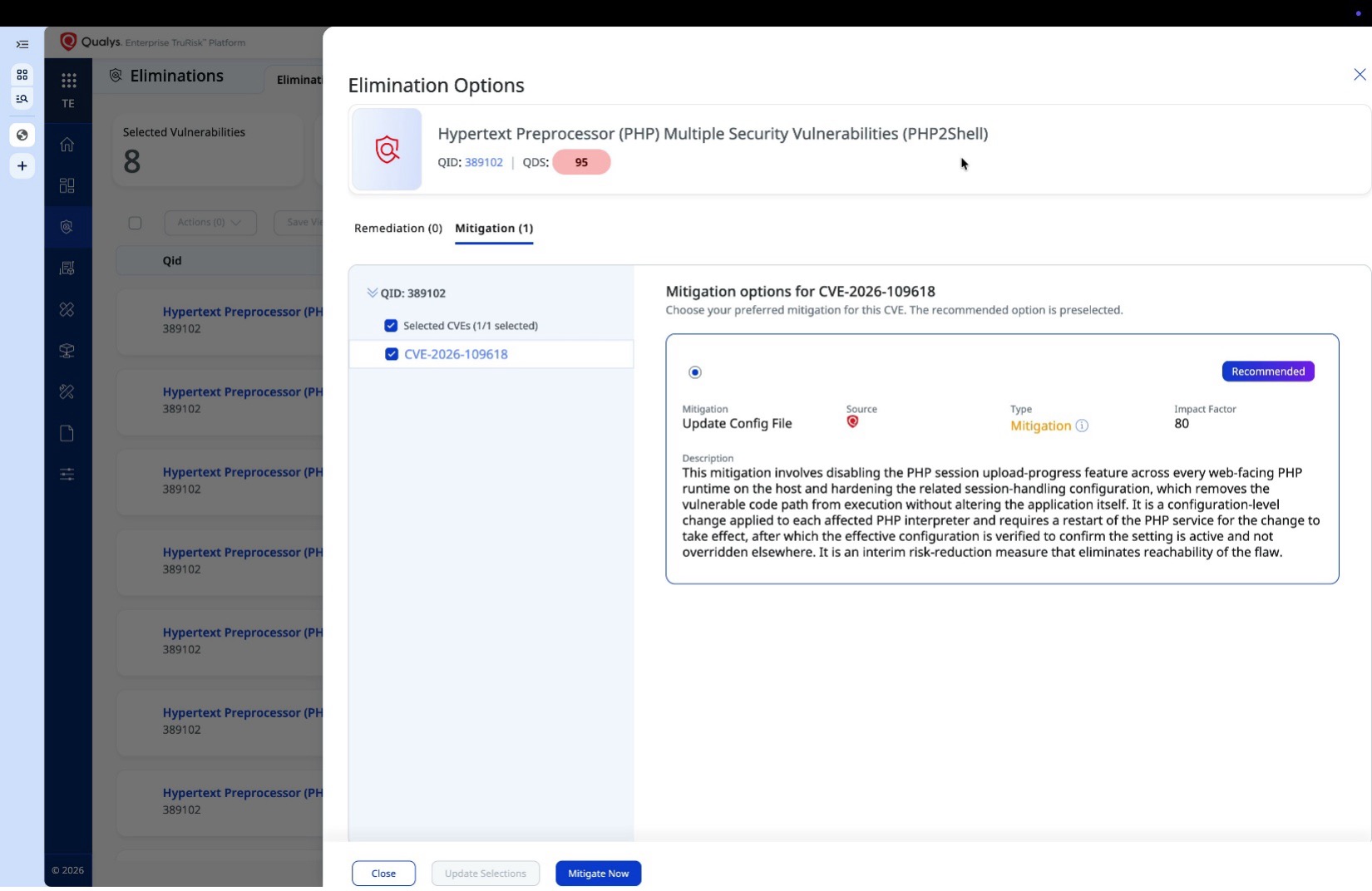
Mitigation reduces risk in the interim, but updating remains the only complete fix. The final step is confirming that every fix has taken effect.
Mitigate PHP Servers Without an Agent
PHP2Shell hits hardest where you have the least reach. Of the 167M PHP installations Qualys found, 156M had a known PHP version, of which 73% are internet-facing and 110M (71%) run end-of-life or end-of-support branches outside upstream support. Many internet-facing PHP servers sit on appliances, DMZ servers, legacy hosts, and systems owned by other teams. These are often the hardest systems to reach, and many can’t run a Cloud Agent.
A network scan can show that these systems are exposed, but mitigating them has usually meant someone logging in and changing configurations by hand, one server at a time. With unauthenticated remote code execution on the table, that pace leaves your perimeter open.

The mitigation script for CVE-2026-109618 and CVE-2026-109619 is now available in through the Custom Assessment and Remediation (CAR) library in TruRisk Eliminate, and you can run it directly on scanner-based hosts. The same platform that finds the exposure can now mitigate it, without deploying an agent first.
- Find your scanner-only hosts. Identify exposed PHP servers with QID 389102 and the unauthenticated check, QID 39033, starting with your external perimeter.
- Run the mitigation with TruRisk Eliminate. Select the PHP2Shell mitigation script in the CAR library and run it on your scanner-based hosts.
- Confirm the mitigation.
Assess Your PHP Configuration Baseline with Qualys Policy Audit
Because PHP’s temporary mitigations for PHP2Shell rely on specific settings in php.ini and PHP-FPM pool configuration files, organizations that cannot patch immediately need visibility into whether PHP’s recommended settings are in place on every PHP host.
Qualys Policy Audit’s out-of-the-box policy, “Assess PHP Secure Configuration Baseline,” helps organizations verify that PHP’s recommended mitigations for CVE-2026-109618 and CVE-2026-109619 are in place while a fix or patch cannot yet be applied. The Qualys Policy Audit team releases these exclusive controls based on PHP-recommended mitigations. The controls support Linux via the Qualys Scanner or the Qualys Cloud Agent, and Windows only via the Qualys Cloud Agent.
Customers can import the policy from the Policy Library by going to Policy Editor > Create a New Policy > Policy from Library and searching for “PHP2Shell.”
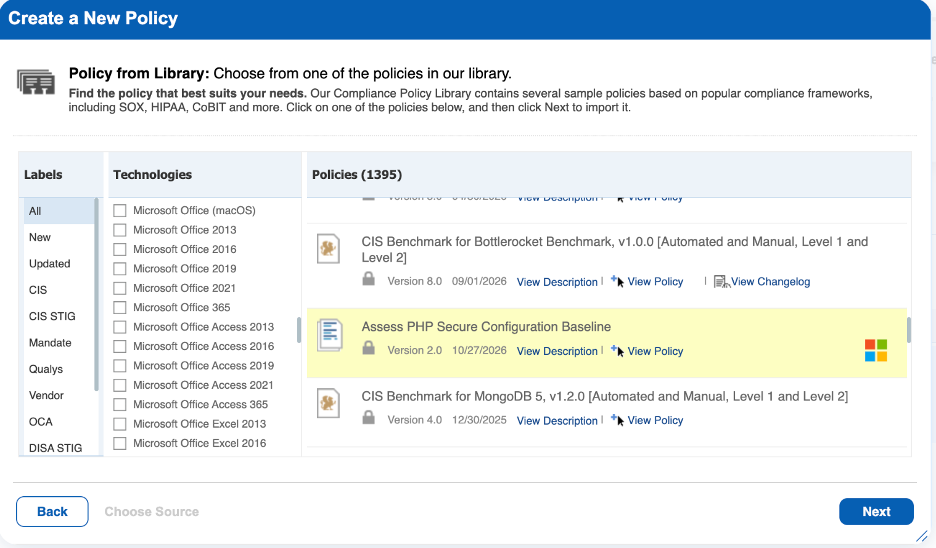
The policy includes the following Qualys Policy Audit Control IDs (CIDs), which support PHP-recommended mitigations for PHP2Shell:
| CID | Statement | CVE |
| 32813 | State of the installed PHP version | CVE-2026-109618 |
| 32814 | Configuration of memory_limit setting in PHP configuration files | CVE-2026-109618 |
| 32815 | Configuration of post_max_size setting in PHP configuration files | CVE-2026-109618 |
| 32820 | Configuration of maximum input nesting level policy | CVE-2026-109618 |
| 32822 | Configuration of upload_max_filesize relative to post_max_size parameters | CVE-2026-109618 |
| 32813 | State of the installed PHP version | CVE-2026-109619 |
| 32817 | Configuration of session.upload_progress.enabled setting in PHP configuration files | CVE-2026-109619 |
| 32818 | Configuration of fatal_error_backtraces setting in PHP configuration files | CVE-2026-109619 |
| 32819 | Configuration of pm.max_requests setting in PHP-FPM pool configuration files | CVE-2026-109619 |
Patch With Confidence
PHP has released upstream fixes, but many vendor and distribution patches are still rolling out. Until a patch is available for your environment, mitigations remain the priority.
Where vendor patches are available, you can deploy them within TruRisk Eliminate. Right now, that includes Ubuntu’s PHP security updates.
For the Ubuntu patch:
- Patch reliability: High. Qualys rates these updates with a High patch reliability score, which means they’re unlikely to disrupt production.
- No OS reboot required. USN-8948-1 updates only PHP userspace packages (php8.1, php8.3, php8.5), not the kernel or core system libraries.
- Restart every service that loads PHP. Running processes keep the vulnerable code in memory until they restart. This matters especially for CVE-2026-109619, which exploits request state that carries over when PHP workers are reused.
3. Remediate and Verify
After remediation, rerun the applicable checks and verify that both the installed packages and running PHP instances include the fixes.
By combining web application and API security findings with PHP vulnerability detections from VMDR and TotalCloud, security teams can better prioritize remediation of internet-facing applications backed by vulnerable PHP installations. After patching the underlying PHP runtime, teams should rescan affected assets and applications to validate remediation.
For a step-by-step verification checklist, see Confirm That Remediation Is Complete in the Technical Appendix.
New to Qualys and want to find out your exposure to PHP2Shell?
Technical Appendix for Security Teams
Current Vulnerability Information for Both CVEs
| CVE-2026-109618 | CVE-2026-109619 | |
| Advisory | GHSA-w8hw-w9fx-j79w | GHSA-6wmf-4rv5-p3rp |
| Title | RCE via OOM corruption | RCE via stale global state |
| Root cause | OOM bailout leaves request data partially initialized; shutdown treats it as valid | Request-owned global state survives after its memory is freed; a later request on the same worker reads it |
| Primitive | Use of uninitialized / invalid memory during request shutdown | Heap use-after-free, memory disclosure |
| Requests needed | One per attempt (mod_php); more workers and traffic raise the attempts needed | Two, on the same worker |
| Demonstrated RCE | mod_php, default limits, prefork MPM | mod_php (8.5 fatal backtrace path); session upload progress path on mod_php, and on PHP-FPM with a suitable application operation |
| CVSS v4.0 | 9.2 AV:N/AC:H/AT:P/PR:N/UI:N/VC:H/VI:H/VA:H/SC:N/SI:N/SA:N | 9.2 AV:N/AC:H/AT:P/PR:N/UI:N/VC:H/VI:H/VA:H/SC:N/SI:N/SA:N |
CWEs (both CVEs): CWE-416 Use After Free; CWE-755 Improper Handling of Exceptional Conditions; CWE-824 Access of Uninitialized Pointer; CWE-1325 Improperly Controlled Sequential Memory Allocation; CWE-1419 Incorrect Initialization of Resource.
Based on the PHP-assigned CVSS scores, exploitation requires no privileges or user interaction and results in a full impact. However, both Attack Complexity (AC:H) and Attack Requirements (AT:P) are set because exploitation depends on the allocator layout, build, and worker scheduling.
Temporary Mitigations Recommended by PHP
Updating is the only complete fix. The following measures, drawn from PHP’s release announcement and detailed security advisories, reduce exposure to specific attack paths. They do not make an unpatched installation safe.
Technical Details
If you cannot update today, PHP recommends a few configuration changes that help reduce the risk to affected assets. The table below explains the reason behind each change.
| Vulnerability | Setting (php.ini form) | Attack Surface Reduction |
| CVE-2026-109618 | memory_limit = -1 | The attacker-controllable memory-limit failure |
| post_max_size = 8M (no uploads) or 32M(uploads); upload_max_filesize below it | Smaller body budget for out of memory conditions | |
| Lower max_input_nesting_level (default 64) and max_file_uploads; front-end limits on decoded size, field count, multipart parts, headers per part, total header count; block multipart where unused | The documented multipart out of memory triggers | |
| Per-worker cgroup memory limit | Availability boundary | |
| CVE-2026-109619 | session.upload_progress.enabled = Off | Confirmed session paths |
| fatal_error_backtraces = Off (PHP 8.5) | Confirmed mod_php backtrace path | |
| Remove invalid or deprecated INI settings applied per request (Apache php_value, .htaccess, PHP_VALUE passed by a front end) | Pre-inititialization diagnostic consumer removal | |
| pm.max_requests = 1 (FPM pool directive, not php.ini) | State carry-over between requests |
The guidance below expands on each of these settings by CVE.
CVE-2026-109618: Out-of-Memory Corruption
- Enforce
memory_limit=-1administratively, such as throughphp_admin_valuein the FPM pool or Apache configuration. Restart every PHP worker and verify that no pool, directory, or application setting restores a finite limit. This removes the attacker-controllable failure caused by PHP’s configured memory limit. Underlying allocation failures can still reach the vulnerable code. - Set conservative request limits. Use
post_max_size=8Mfor applications that do not require file uploads, orpost_max_size=32Mwhere uploads are necessary. Keepupload_max_filesizebelowpost_max_size. - Limit request size and complexity. Independently enforce decoded request-size limits at the web server or proxy, including requests without a usable
Content-Length. Reducemax_input_nesting_leveland bound input variables, multipart parts, headers within each part, and uploads. Consider enforcing these additional limits at the web server or proxy. If the application does not use multipart form data, block those requests before they reach PHP. - Use container or cgroup memory limits as an availability boundary, preferably configured to terminate only the affected worker. These limits do not guarantee protection against allocation failures. Do not substitute
RLIMIT_ASorRLIMIT_DATA, which can force allocation failures that trigger the vulnerable path.
Note: Setting memory_limit=-1 removes PHP’s per-request memory cap and increases the risk of resource exhaustion. Treat it as a temporary measure and account for available resources and worker-level limits.
CVE-2026-109619: Stale Global State
- Set
session.upload_progress.enabled=0before request parsing, usingphp.ini, an FPM pool, or server configuration, and restart every worker. Do not rely on application-levelini_set()or FPM.user.ini. This blocks the confirmed session paths only. - On PHP 8.5, set
fatal_error_backtraces=0administratively and restart every worker. This blocks the confirmed fatal-backtrace path only. - Remove invalid or deprecated per-request settings that generate diagnostics before initialization. Also resolve warnings and other diagnostics produced during extension post-deactivation or server cleanup. Suppressing messages through
error_reporting,display_errors, or@does not prevent the underlying access. - Fix fatal errors and execution timeouts that attackers can trigger, including failures in callbacks, uploads, imports, and cleanup. Address the underlying failure; changing timeout settings alone does not cover other vulnerable paths.
- For PHP-FPM, consider
pm.max_requests=1if the performance cost is acceptable. This limits each worker to one request. It is an optional measure for FPM and does not replace patching.
If a patched build cannot be deployed promptly, consider restricting public access or temporarily isolating the affected service while remediation is arranged. Assign an owner and a remediation deadline to each system awaiting an update.
Confirm That Remediation Is Complete
Installing a package is one step. Verify that each application is actually using the patched runtime.
- Find every PHP installation. Include parallel PHP branches, containers, hosting-panel packages, and PHP bundled with appliances or other software. The version returned by
php -vmay belong to a different installation from the one serving web requests. - Update the correct package, binary, or image. For distribution packages, check the complete package version against the vendor’s advisory. For container deployments, obtain a patched image or rebuild your application image with patched dependencies.
- Restart or replace affected workers. Restart the relevant services or redeploy containers, then confirm that the running application uses the updated runtime. Check for workers that remain on the previous build.
- Review emergency configuration changes. After verifying the patched runtime, restore an appropriate finite
memory_limitand review temporary upload restrictions and worker-recycling settings. Test application behavior under memory pressure: the patched runtime can terminate a worker immediately at its hard memory threshold, bypassing normal shutdown handlers. - Verify Web Applications and APIs. After patching the affected PHP runtimes and restarting the associated services, rescan your web applications and APIs using Qualys TotalAppSec with QIDs 533086 and 533068, as needed, to reassess exposure to PHP2Shell and validate the effectiveness of your remediation efforts.
Important: Exercise caution when using QID 533068. This QID performs an intrusive vulnerability check that may cause unpatched PHP applications or APIs to crash, potentially disrupting service availability. We recommend enabling this check only in non-production environments or on systems that have been confirmed to be patched. Before running QID 533068 in production, evaluate the potential operational impact, obtain the necessary approvals, and conduct testing within an approved maintenance window. Avoid running this check against unpatched or unverified production systems.
For complete remediation verification, also check the installed PHP version and patch status using Qualys VMDR or TotalCloud assessments.
Connect Your AI Assistant to Qualys in Three Steps
You can now bring Qualys data into your AI workflows with qualys-cli-mcp, a Model Context Protocol (MCP) server for the Qualys Cloud Platform. Claude, Cursor, VS Code, and other MCP-capable assistants can use it to query your Qualys environment in plain language. For example, you can ask “Can you check in Qualys if I’m vulnerable to CVE-2026-109618 or CVE-2026-109619″ without writing API calls or switching consoles.
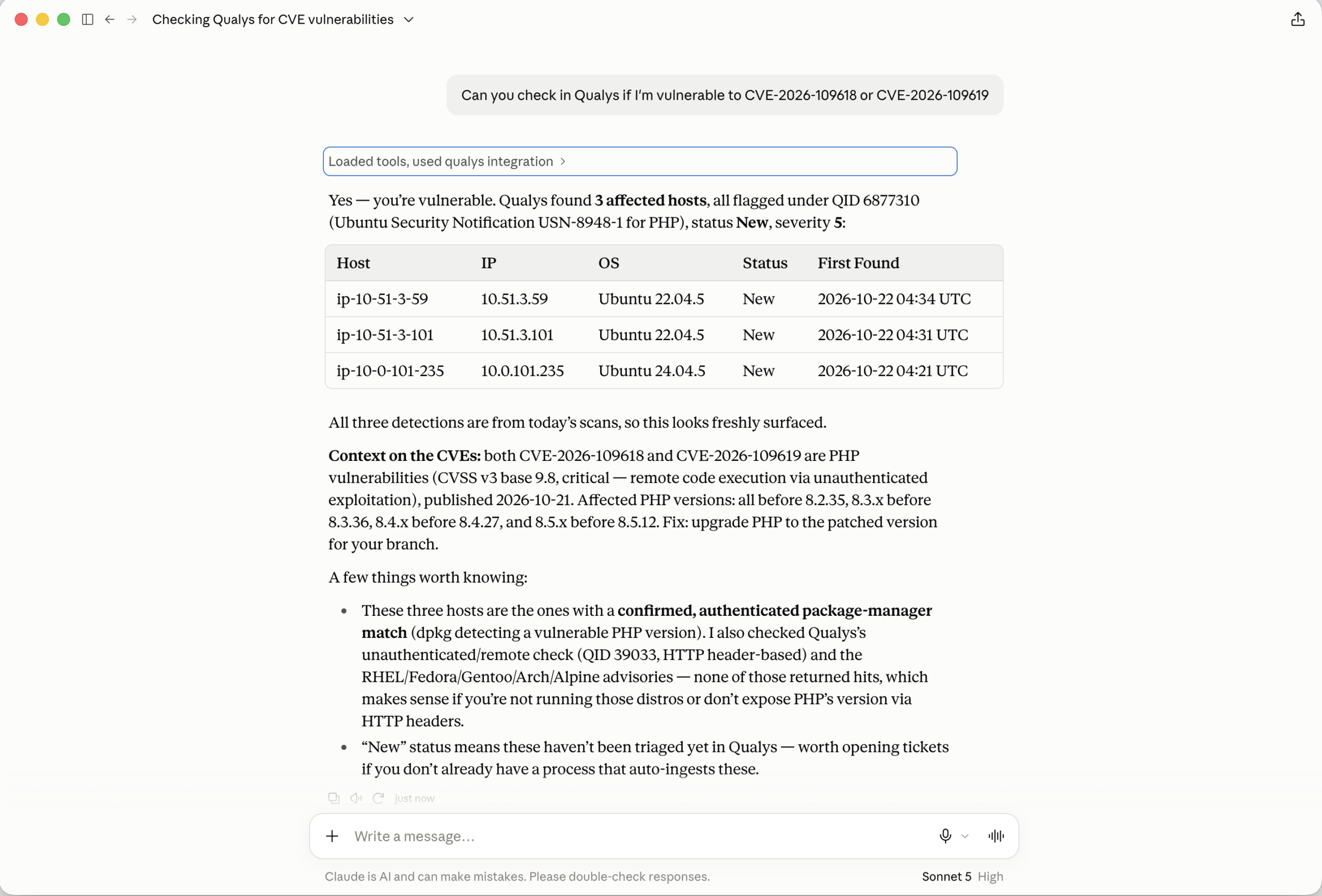
| Step | Action |
|---|---|
| Install (requires Python 3.11 or later) | pip install qualys-cli-mcp |
| Configure your credentials | qualys-cli configure It asks for your Qualys username and password, automatically detects your platform, and securely stores the credentials in your OS keyring. Your credentials never go into the AI client’s config file. |
| Connect your AI client | For Claude Desktop, add this to claude_desktop_config.json (VS Code and Cursor use the same entry): { “mcpServers”: { “qualys”: { “command”: “qualys-cli-mcp” } } } |
That’s it. Your assistant can now work across Qualys.
Reference
PHP Security Team – Upcoming Critical PHP Security Release