

Can’t Patch PHP2Shell Yet? Build a Stopgap with the Controls You Own

Last updated on: November 17, 2026
Executive Summary
PHP2Shell’s fix is to update PHP, but patching at scale is slow. Only 199,000 of 156 million PHP installations were patched in the first 12 hours after disclosure. In the meantime, Qualys’s configuration-level mitigation reduces exposure to the confirmed attack path without code changes, with or without an agent. WAF, IPS, and EDR protections from major vendors add further layers, and TruConfirm shows which hosts are actually reachable: 25 of 1,539 in one customer environment. Soon, Qualys ETM will factor these controls into risk scores. These controls buy time, but patching remains the only complete fix.
PHP2Shell comes with a clear instruction: update PHP. Fixed releases exist for supported branches. Patching at this scale still takes time. In Qualys telemetry, only 199,000 of the 156 million PHP package installations with a known version (about 0.13%) had been patched in the first 12 hours after disclosure.
Those first days are where mitigations and compensating controls earn their place. They reduce risk while updates roll out, and the right visibility shows which servers need attention first. Our PHP2Shell blog post covers detection and fixed versions.
Here is how to bridge the gap between disclosure and patch, in four steps: find and prioritize exposed PHP, apply the Qualys mitigation, layer the controls you already run, then patch and verify.
Step 1: Find and Prioritize Exposed PHP
Qualys customers can identify PHP installations through network scans, Cloud Agents, container assessments, and Deep Scan, where supported. Additionally, they can assess exposed web applications and APIs using Qualys TotalAppSec. To facilitate PHP discovery, use QID 45110, followed by the relevant vulnerability-detection QIDs and software-inventory QIDs, to assess the assets in scope.
It is important to note that not every vulnerable host has the same level of exposure. TruConfirm helps validate the indicators of the tested PHP2Shell entry point. Its benign probe checks whether this entry point is reachable and whether the upload-progress mitigation is absent, all without creating files, executing code, or applying memory pressure. For more details, refer to our PHP2Shell blog post, which explains how the probe works.
In one customer environment with 1,539 assets running PHP, TruConfirm returned positive validation results for 25 of those assets. Consider these results alongside their internet exposure and business criticality to determine what vulnerabilities to prioritize for mitigation and patching. Keep in mind that a negative result does not guarantee that all exploitation paths are closed.
Step 2: Apply the Qualys Mitigation
Qualys provides a configuration-level mitigation for PHP2Shell based on PHP’s guidance and insights from the Qualys Threat Research Unit. It turns off session upload progress and hardens related session-handling configuration on supported hosts. This reduces exposure to the confirmed session-lifecycle attack path without requiring application-code changes.
It does not eliminate every exploitation path associated with the two CVEs. Test applications that depend on upload-progress functionality after the change.
- With or without an agent. Customers with vulnerable detections can select Mitigate Now from their dashboards. For appliances, DMZ servers, and legacy hosts that cannot run a Cloud Agent, the same mitigation script is available in the Custom Assessment and Remediation (CAR) library in TruRisk Eliminate and runs directly on scanner-based hosts.
- Configuration-level, with restart verification. The mitigation applies configuration changes and automatically restarts the PHP service. Review the execution logs and restart the service manually if a restart is still required. Confirm that every affected PHP worker has picked up the new configuration.
- Verified, not assumed. After the restart, Qualys checks the effective configuration to confirm the setting is active and not overridden elsewhere.
Step 3: Add Layers from the Security Stack You Already Run
The tools already in your environment can work alongside the mitigation, each at a different point in the attack path. Each layer can catch what the one before it misses
Inbound: WAF and IPS. WAF and IPS vendors such as Akamai, Cloudflare, F5, Palo Alto Networks, Fortinet, and Check Point have released signatures that name both CVEs. They help block exploit requests before those requests reach PHP. Cloudflare has reported attack traffic that includes evasion attempts, so treat signatures as one of several layers.
After exploitation: EDR. Behavioral policies in endpoint tools such as CrowdStrike Falcon, Microsoft Defender for Endpoint, and Cortex XDR add a second line of defense. They help stop what an attacker tries next, such as a web server process launching a shell or dropping a web shell.
PHP2Shell 3rd-party mitigation and compensating controls
Select the WAF, IPS, and EDR you run to see the exact signatures and policies each vendor has released for CVE-2026-109618 and CVE-2026-109619, ready to copy into your console.
-
Edge
WAF
None
-
Network
IPS
None
-
Host
EDR
None
Platform
Note: Rule and policy IDs are as published by each vendor in October 2026; confirm them in your console. The endpoint policies act after exploitation and are mapped to the attacker’s next step, not to the CVEs themselves, so verify each one fires for your PHP worker. Compensating controls reduce risk; updating PHP remains the only complete fix.
Step 4: Patch, Restart, and Re-Validate
Mitigation reduces risk in the interim. Updating remains the only complete fix. You can deploy supported vendor patches through TruRisk Eliminate. Qualys reports a High patch reliability rating for these updates and no OS reboot requirement for this PHP package update.
A patch isn’t finished when the package installs:
- Restart every service that loads PHP.
- Verify the installed packages and that running PHP workers are on the patched build.
- Repeat TruConfirm validation and verify the effective configuration. Do the same after applying the mitigation in Step 2.
Coming Next: Give Your Controls Credit in Qualys ETM
The capabilities described in this section are in development and subject to change.
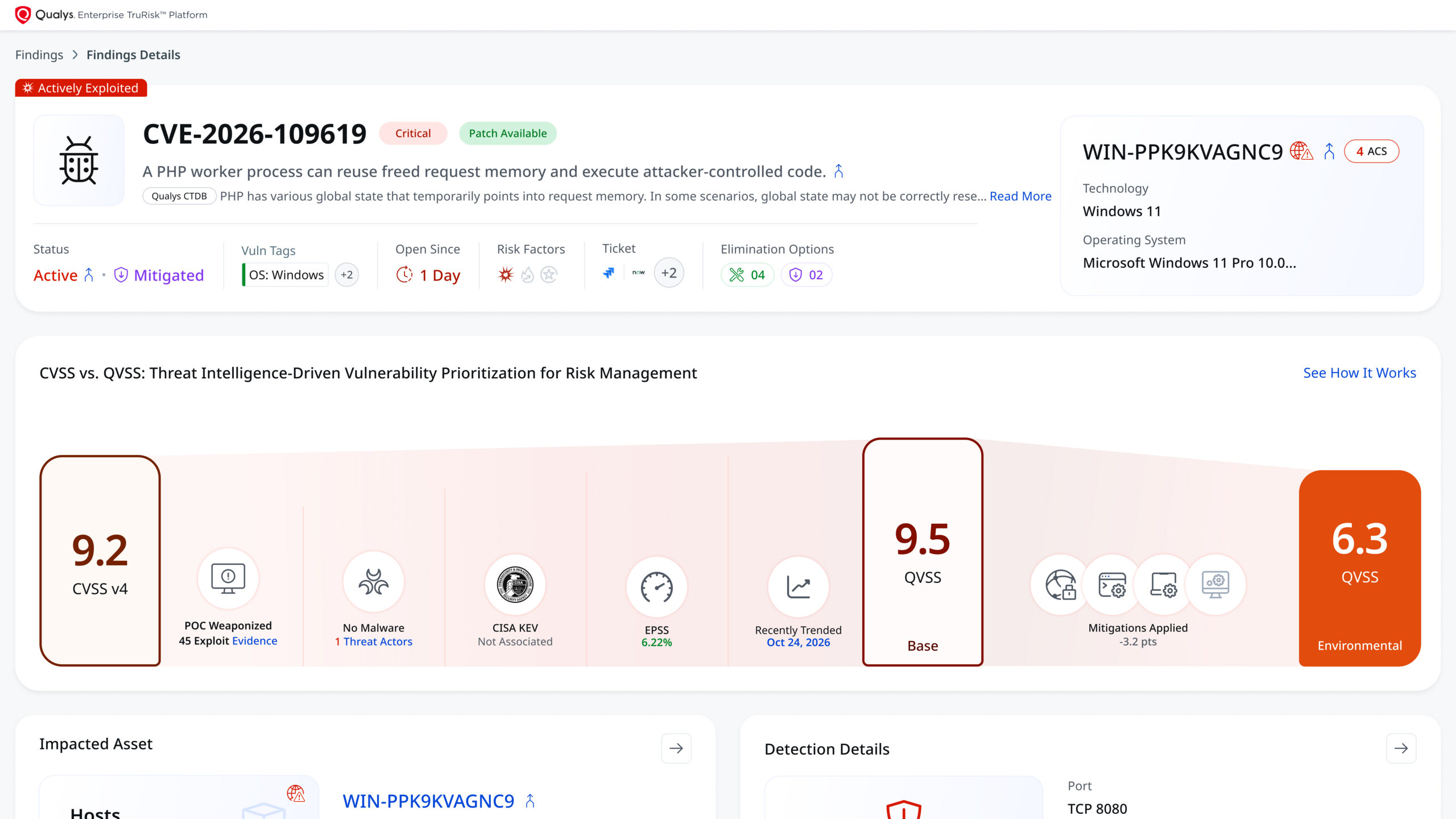
Two servers can run the same unpatched PHP build and carry very different risks. One sits behind a WAF rule that names both CVEs, with EDR watching its web server process. The other faces the internet with nothing in front of it. A traditional scan reports them the same way.
Qualys ETM is being extended to close that gap. It arrives in three steps:
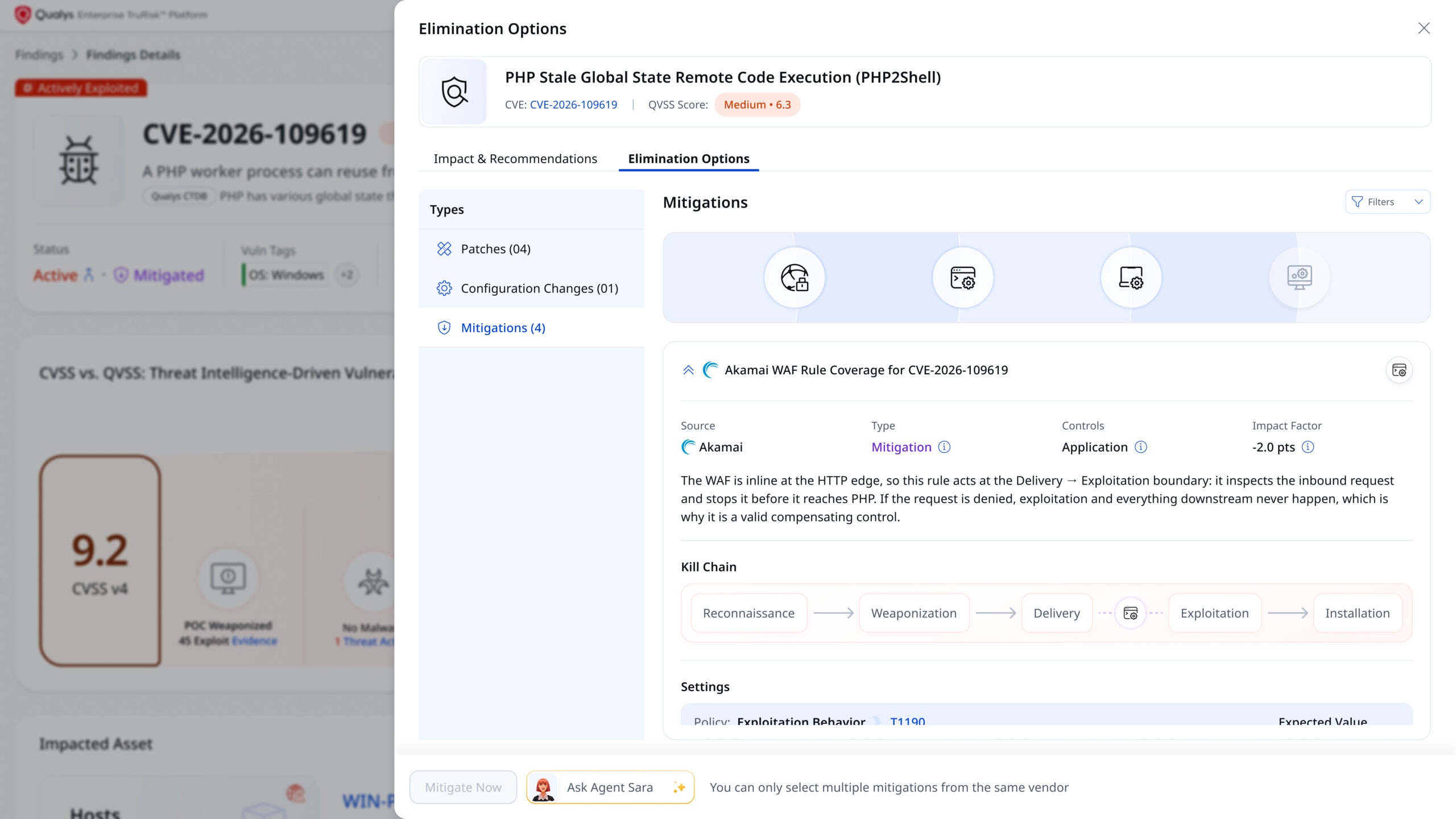
- Recommendations on every finding (coming soon). ETM will show which applicable third-party controls can reduce exposure for each vulnerability, so teams know what to enable and where.
- Controls reflected in the score. Controls that are in place will lower a finding’s QVSS score to reflect your actual defenses, shown as the Environmental score, so remediation queues focus on what still needs attention.
- Action from the same platform. Teams will be able to apply third-party mitigations through TruRisk Eliminate from the platform that found the exposure.
Where to Start
- Find. Use QID 45110 to support PHP discovery to detect CVE-2026-109618 and CVE-2026-109619, then use the applicable vulnerability detection QIDs and software inventory to assess assets in scope.
- Use TruConfirm results alongside internet exposure and business criticality to prioritize remediation.
- Mitigate. Apply the Qualys mitigation to systems awaiting an update, using agent-based or scanner-based execution as applicable. Verify the effective configuration and required restarts.
- Layer. Keep applicable WAF, IPS, and EDR protections enabled and current as additional layers.
- Patch and verify. Deploy the PHP or vendor update, restart every service that loads PHP, verify that the patched build is running, and repeat the relevant validation checks.
Compensating controls buy valuable time, but they do not remove the flaw. Keep tracking every system until it is patched.
Not a Qualys customer? Access Qualys’ free PHP2Shell mitigation service to help protect your environment against this threat.
Contributors
- Saeed Abbasi, Director, Product Management for Security Research, Qualys