

PHP2Shell on Windows and macOS: Automating the PHP Upgrade, With or Without an Agent

Executive Summary
PHP2Shell (CVE-2026-109618 and CVE-2026-109619) allows unauthenticated remote code execution on exposed PHP servers. PHP has released fixed versions. On Linux, distribution packages carry the fix. On Windows and macOS, they don’t: Microsoft and Apple don’t ship PHP, so the fix is an in-place PHP upgrade that has traditionally been done by hand, one server at a time. Qualys TruRisk Eliminate’s Custom Assessment and Remediation (CAR) capability runs Qualys TRU-published scripts that upgrade each PHP installation to the latest patch release of its current minor series. On Windows, the script verifies the official build by SHA256 and rolls back on failure. On macOS, it upgrades through Homebrew. If a host is on an end-of-life series, the script stops, reports it, and then you apply the PHP2Shell mitigation script instead. The same script runs through the Cloud Agent or, on hosts without one, through an authenticated Qualys scanner. Agentless runs need a Windows or SSH credential with rights to stop services and replace PHP binaries. Plan a maintenance window for both because IIS, Apache, or php-fpm restarts during the upgrade.
PHP has released a critical security update addressing two vulnerabilities, CVE-2026-109618 and CVE-2026-109619 (collectively tracked as PHP2Shell), that allow unauthenticated remote code execution against exposed PHP servers.

Read More
Discover how Qualys helps detect, mitigate, and patch two critical PHP2Shell vulnerabilities that put web servers at risk.
On Linux, patching is straightforward: distribution vendors ship updated packages, and Qualys TruRisk Eliminate deploys them.
Windows and macOS are a different story. There is no straightforward vendor patch to deploy, so the fix must be a PHP upgrade, which has traditionally required someone to log in to each server and apply it manually. This blog explains how the Qualys Custom Assessment and Remediation (CAR) capability in Qualys TruRisk Eliminate closes the gap for both deployment models: agent-based and agentless (scanner-based).
Why Patch Management Can’t Deliver the Fix on Windows and macOS
Patching works by deploying the fix that an operating system or software vendor publishes. For PHP on Windows and macOS, that fix does not exist in a deployable form.
- Windows: no official installer or updater. Microsoft does not ship PHP, and PHP does not ship an installer or an in-place updater for Windows. The official builds on downloads.php.net are plain ZIP archives published in multiple flavors (Thread Safe / Non-Thread Safe, x64 / x86, and per Visual Studio compiler). Upgrading means picking the right build, stopping IIS or Apache, replacing the binaries in place while preserving php.ini and custom extensions, and restarting services. Third-party stacks such as XAMPP, WampServer, Laragon, Chocolatey and Scoop each add their own layout on top of that.
- macOS: Apple no longer ships PHP. PHP was removed from macOS in Monterey (12.0), and Apple software updates do not touch it. php.net publishes only source code, so on modern Macs, PHP most commonly comes from Homebrew (the php formula or a versioned php@8.x formula).
The result is that a PHP server on Windows or macOS will appear vulnerable, with no corresponding patch in the TruRisk Eliminate patch catalog. The vulnerability is real; the remediation path is not a patch.
Custom Assessment and Remediation Closes the Gap with TruRisk Eliminate
TruRisk Eliminate covers four remediation paths: patch, mitigate, isolate, or run a custom script. PHP on Windows and macOS needs the fourth. The CAR capability in TruRisk Eliminate lets you run controlled remediation scripts on your assets from the same platform that detected the exposure. The Qualys Threat Research Unit (TRU) has published PHP upgrade scripts for Windows and macOS in the CAR library so that every host is upgraded the same way. Search the library for “PHP Update to Latest Patch Version” under the PHP2Shell category and import the script for each platform.
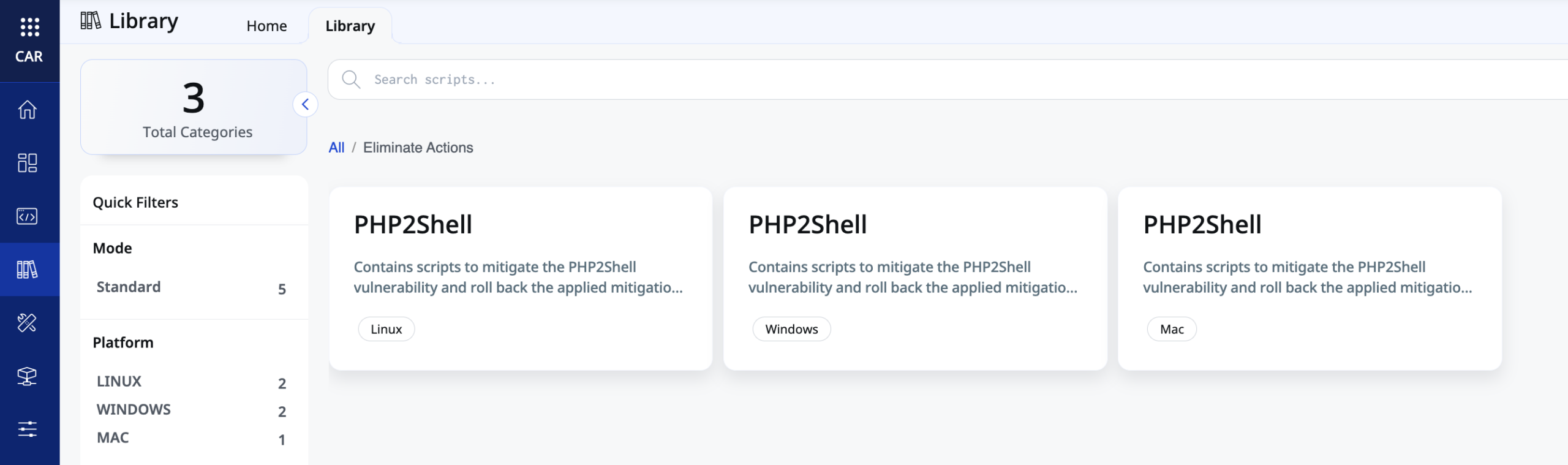
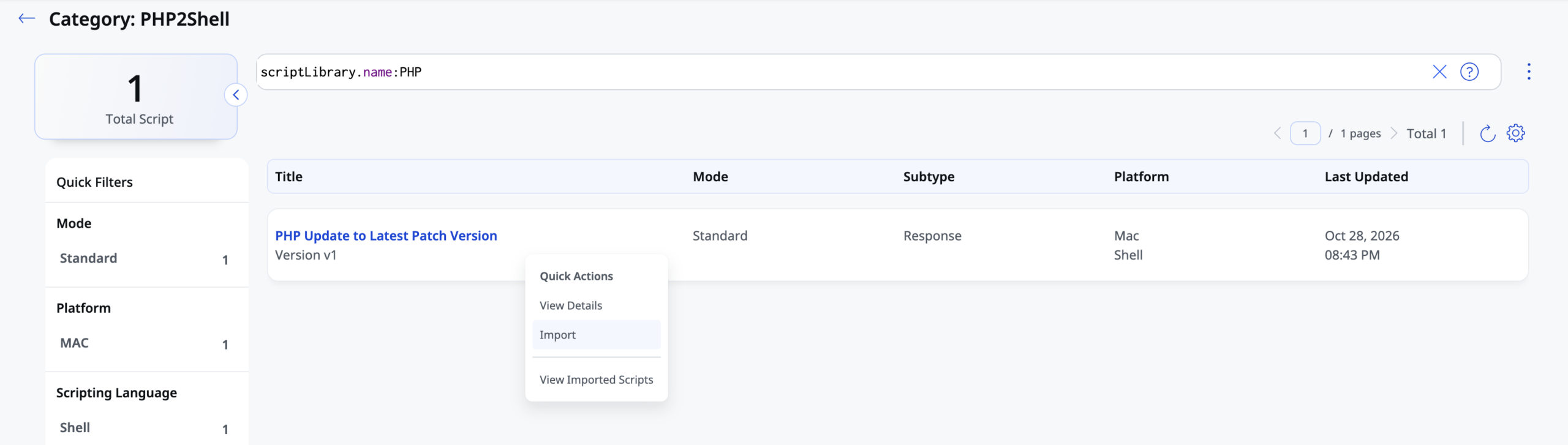
Both scripts are built around the same principles:
- Upgrade within the installed minor series only. 8.2.33 moves to the latest 8.2.x, 8.4.27 to the latest 8.4.x. The scripts never jump a major or minor version, so applications keep running on the branch they were tested against.
- Mitigate what can’t be upgraded. If the installed series is end-of-life and no longer published, the script stops and reports it instead of guessing. For those hosts, deploy the PHP2Shell mitigation script from the CAR library. It applies configuration changes that block the attack path and restarts the affected services. Mitigation reduces the risk until you can move to a supported branch; it doesn’t replace the upgrade.
Windows: Official Builds, Verified and Rolled Back on Failure
- Discovers every PHP installation on the host, not just the one on PATH: machine and per-user PATH entries, common folders (C:\php*, XAMPP, WAMP, Laragon, Program Files, Scoop), IIS FastCGI handlers in applicationHost.config, and any Windows service that launches a PHP binary.
- Detects each installation’s exact build flavor (TS/NTS, x64/x86, VC15/VS16/VS17) by querying php.exe itself, then selects the matching official build from downloads.php.net/releases.json.
- Honours the machine WinHTTP proxy automatically, since the SYSTEM account has no user proxy settings.
- Downloads the archive and verifies its SHA256 against the published hash before anything is touched.
- Stops IIS (W3SVC/WAS), Apache and any php/php-cgi processes using that directory, takes a full backup of the PHP folder, copies the new binaries over the top (php.ini and extra extensions are preserved), and confirms the new version by running php.exe.
- Rolls back from the backup and restarts services automatically if the post-upgrade version check fails.
macOS: Homebrew Upgrades Within the Same PHP Series
The macOS script handles the realities of Homebrew, as follows:
- Confirms PHP is present and resolves the real binary through symlinks into the Homebrew Cellar to determine which formula owns it (php or php@8.x). PHP from MacPorts, MAMP or a manual build is reported and left alone.
- Runs brew as the user who owns the Homebrew installation, because Homebrew refuses to run as root even though CAR executes as root. It also repairs any Homebrew files left owned by root from earlier runs so brew can write to them.
- Refreshes Homebrew with retry handling for the common “another brew update is already running” case, and falls back to cached formula data if the refresh fails.
- Stays on the installed series. If the default PHP formula has moved to a newer series (for example, the host is on 8.2.x but PHP now tracks 8.4), the script installs or upgrades PHP 8.2 and relinks the PHP command to it rather than forcing a major upgrade.
- Restarts the php-fpm service via brew services if it was running before the upgrade and prints the final php -v so the result is visible in the job output.
Agent or Agentless: The Same Script Reaches Every Host
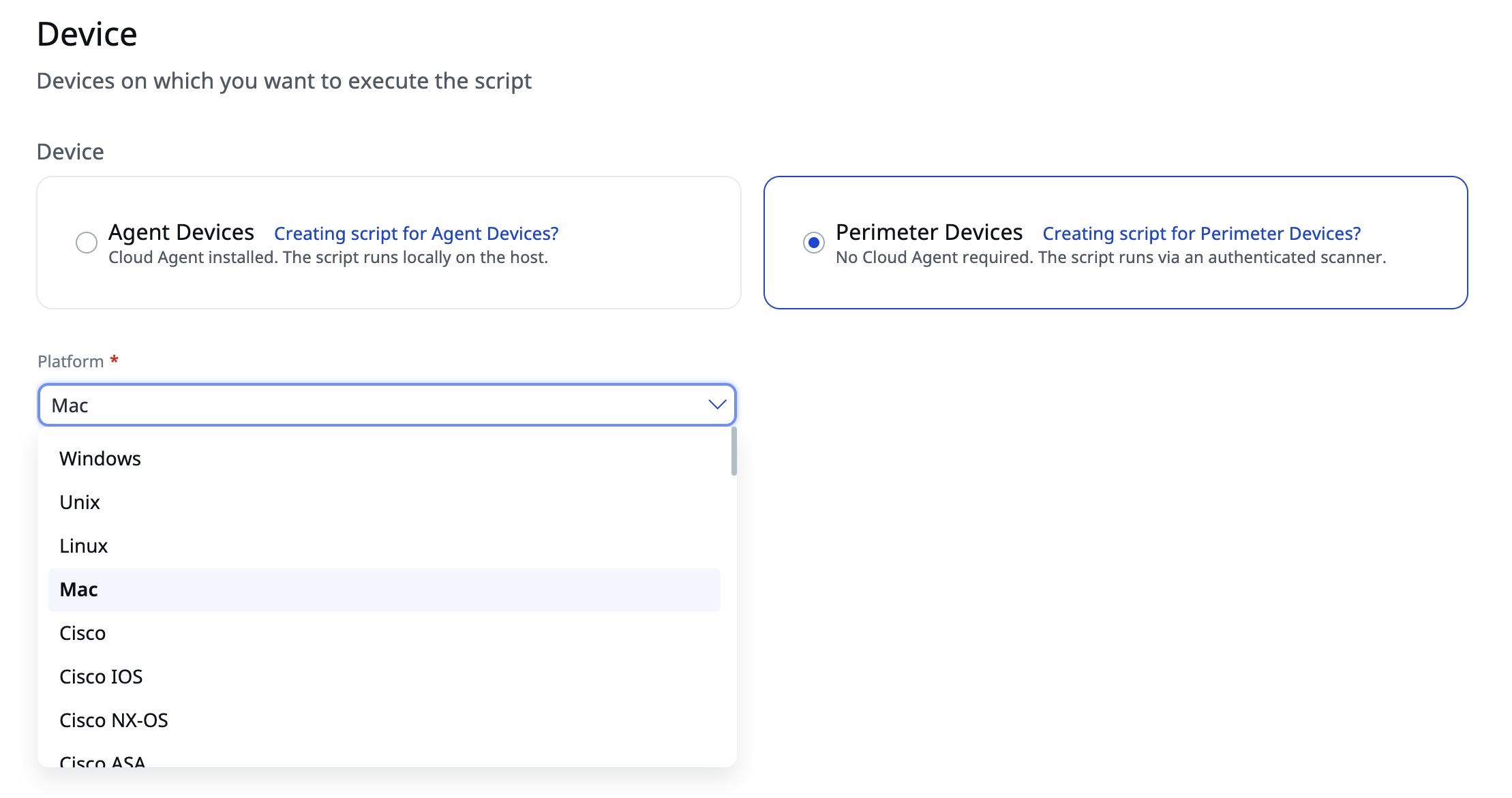
When you create a script in CAR, you choose how it reaches the host. Agent Devices run the script locally through the installed Cloud Agent. Perimeter Devices require no Cloud Agent. The script is delivered and executed through an authenticated Qualys scanner. The script content is identical in both cases; only the delivery changes. Select Windows or Mac as the platform to match the script.
Agent-Based Remediation
- In ETM, identify Windows and macOS hosts flagged for the PHP2Shell CVEs (CVE-2026-109618 and CVE-2026-109619) and tag them by platform.
- In CAR, create or import the Windows and macOS PHP upgrade scripts with Agent Devices selected and run each against its platform tag.
- Schedule the install run in a maintenance window, since IIS, Apache, or php-fpm will be restarted.
- Review job results and rescan to confirm the QID closes.
Agentless Remediation
Many exposed PHP servers sit on appliances, DMZ servers, legacy hosts, and systems owned by other teams: a Windows Server in the DMZ running a vendor web application on IIS and PHP, or Mac minis in a build lab owned by engineering. Many can’t run, or aren’t allowed to run, a Cloud Agent.
A network scan can show that these systems are exposed, but remediating them has usually required someone to log in and make changes by hand, one server at a time. With unauthenticated remote code execution on the table, that pace leaves your perimeter open.
With the CAR capability in TruRisk Eliminate, the same Windows and macOS PHP upgrade scripts run directly on scanner-based hosts through the Perimeter Devices option.
- Find your scanner-only hosts. In ETM, identify exposed PHP servers using the PHP2Shell CVEs (CVE-2026-109618 and CVE-2026-109619).
- Create the scripts for Perimeter Devices. In the CAR module of TruRisk Eliminate, select the PHP upgrade script for the host’s platform from the library, choose Perimeter Devices and Windows or Mac, and point it at the scanner appliance that can reach those hosts with the appropriate authentication records (Windows or SSH).
- Run the job. Launch the job against your scanner-based hosts. The scripts behave identically whether launched from an agent or a scanner.
- Confirm the remediation. Review the job output for the recorded before/after version on each host, then rerun the scan and confirm the QID no longer reports.
What the Job Output Looks Like
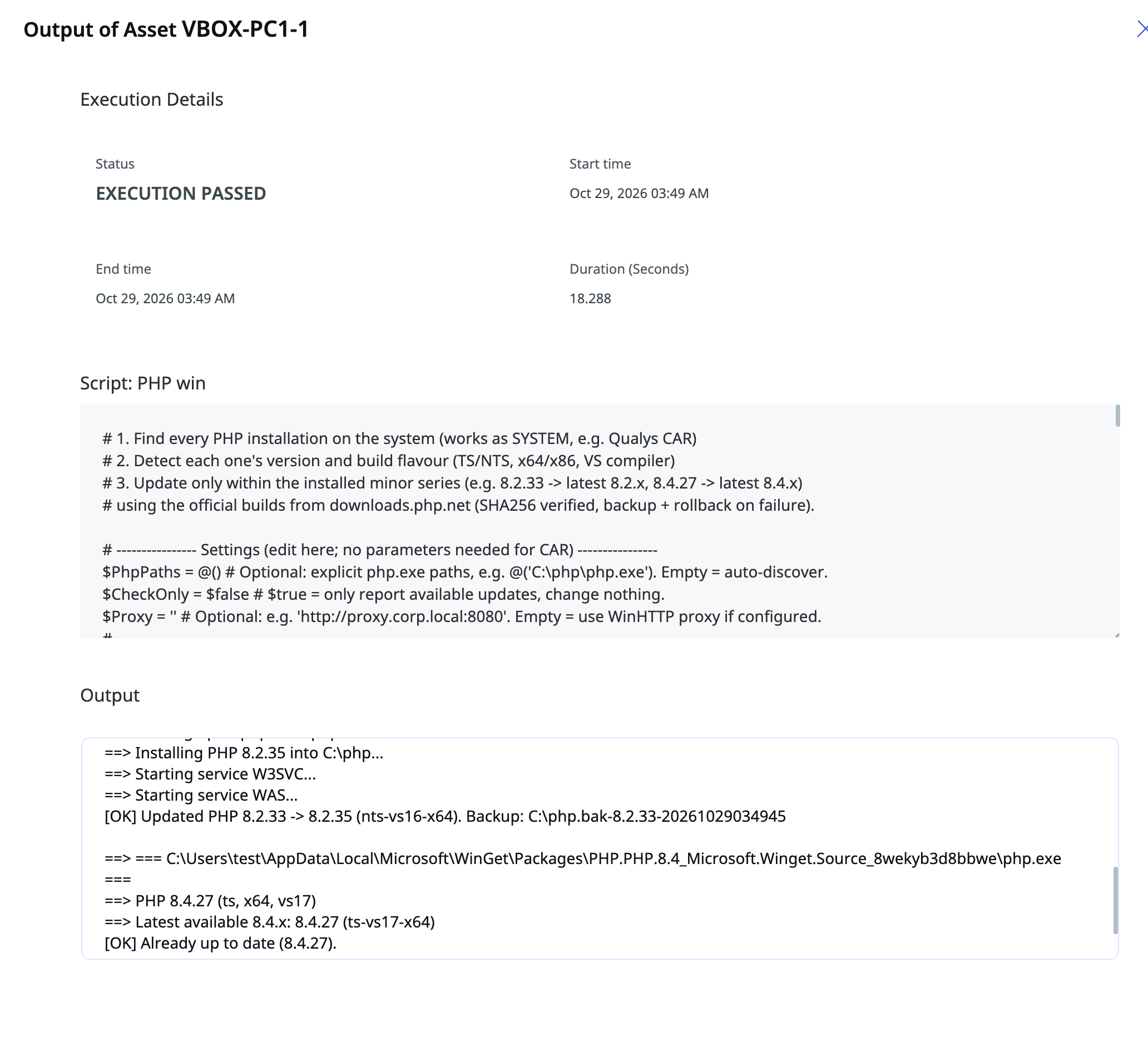
Each host returns a short, readable log entry with the execution status and the before/after PHP versions. Below, a scanner-based macOS host is upgraded from PHP 8.2.33 to 8.2.35 within the 8.2 series, with the php@8.2 formula relinked as the active PHP.
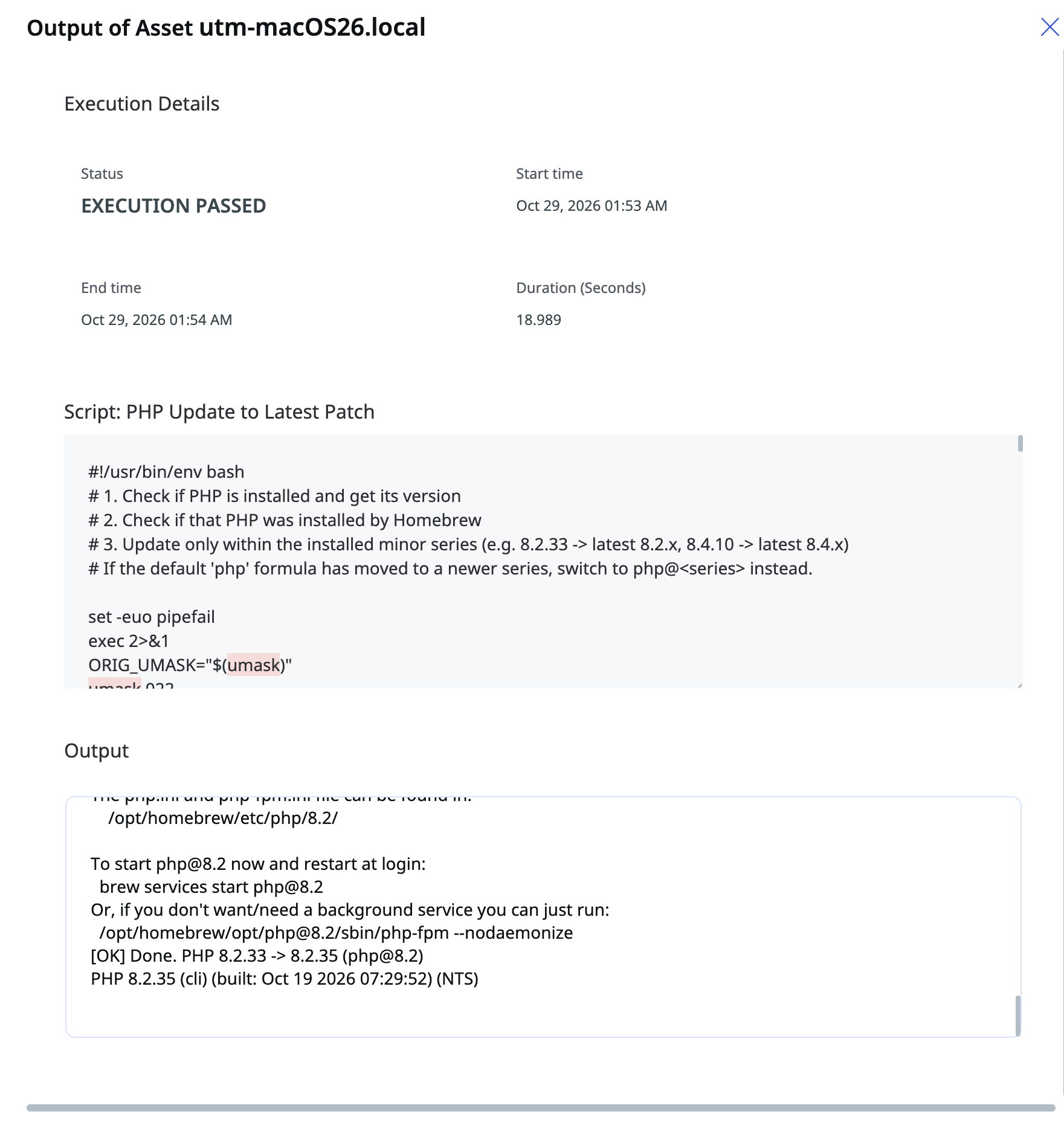
On Windows, the log additionally lists every PHP installation discovered on the host, the detected build flavor, SHA256 verification, the services stopped and restarted, and the backup folder location.
Conclusion
PHP2Shell is a reminder that remediation goes beyond patching. When there is no straightforward vendor patch to deploy, you still need a safe, fast way to close the exposure. With TruRisk Eliminate, you can discover every PHP installation, upgrade it to the latest release of its current series with integrity verification, automatic rollback, and service restart, and do it from the same console that detected the exposure, agentless on scanner-only hosts and through the Cloud Agent where it is installed.
Qualys customers can find the Windows and macOS PHP upgrade scripts, along with the PHP2Shell mitigation script, in the CAR script library. Review the CVEs (CVE-2026-109618 and CVE-2026-109619) in ETM and begin with your internet-facing perimeter.
Not a Qualys customer? Access Qualys’ free PHP2Shell mitigation service to help protect your environment against this threat.
Frequently Asked Questions (FAQs)
Will the script jump me from PHP 8.2 to 8.4?
No. It upgrades only within the installed minor series. 8.2.33 moves to the latest 8.2.x. Applications stay on the branch they were tested against.
What happens on an end-of-life series?
The script stops and reports it. Deploy the PHP2Shell mitigation script until you can move to a supported branch.
Does this work without a Cloud Agent?
Yes. Choose Perimeter Devices and run the same script through an authenticated Qualys scanner. You need a Windows or SSH credential with rights to stop services and replace PHP binaries.
What does the Windows script verify?
It detects the build flavor, downloads the matching official build from downloads.php.net, verifies SHA256 before anything is touched, and rolls back from a full backup if the post-upgrade version check fails.