

Run Your Qualys Program by Conversation, Inside Google Cloud’s Gemini Enterprise

Qualys ROCky for Gemini Enterprise, now available on Google Cloud Marketplace, allows you to ask your vulnerability, asset, and risk questions, get an answer ranked by real risk, and act on it, without leaving Gemini Enterprise.
With the introduction of frontier AI models, vulnerabilities are now being discovered and weaponized at machine speed. Unfortunately, most security teams still triage at human speed. A typical enterprise carries thousands of open findings and can fix only a small fraction of them, yet leadership still expects a straight answer to a simple question: Are we keeping up? Getting that answer usually means exporting a scan, building a spreadsheet, and losing an afternoon.
Today, we are live with Qualys ROCky for Gemini Enterprise. It puts your Qualys vulnerability, asset, and risk data one question away, right inside Gemini Enterprise, and it can even take the next step in the process for you, with a person in control of any changes to an asset.
Your Program, By Conversation
The agent turns interactions with the Qualys Enterprise TruRisk Platform into a conversation. Four things it does well:
- Ask about your data. “Which of my internet-facing hosts is the biggest risk?” “Are we exposed to Log4Shell?” “What is tied to ransomware?” Whatever your risk management question, you get an answer from your subscription in seconds, in plain language, rather than a raw export.
- Prioritize by real risk. Ask what to fix first, and the agent returns a worklist ranked by the Qualys Enterprise TruRisk score. It surfaces the handful of vulnerabilities that are actively exploited, listed in the Cybersecurity and Infrastructure Security Agency (CISA) Known Exploited Vulnerabilities (KEV) catalog, or associated with ransomware, and it explains why each one matters. Half a day of specialist triage becomes a two-minute, defensible decision.
- Remediate with confirmation. When you are ready to act, the agent stages a patch job in TruRisk Eliminate and shows exactly what will deploy, patch stability, and to how many assets. Nothing changes a host until you explicitly say yes. You go from finding to fixing in the same conversation, with a clear record of who approved what.
- Prove you are keeping up. Ask for your mean time to remediate, how your open CISA KEV backlog is aging, or how current your scan data is, and the agent answers on demand, in the terms boards and auditors expect.
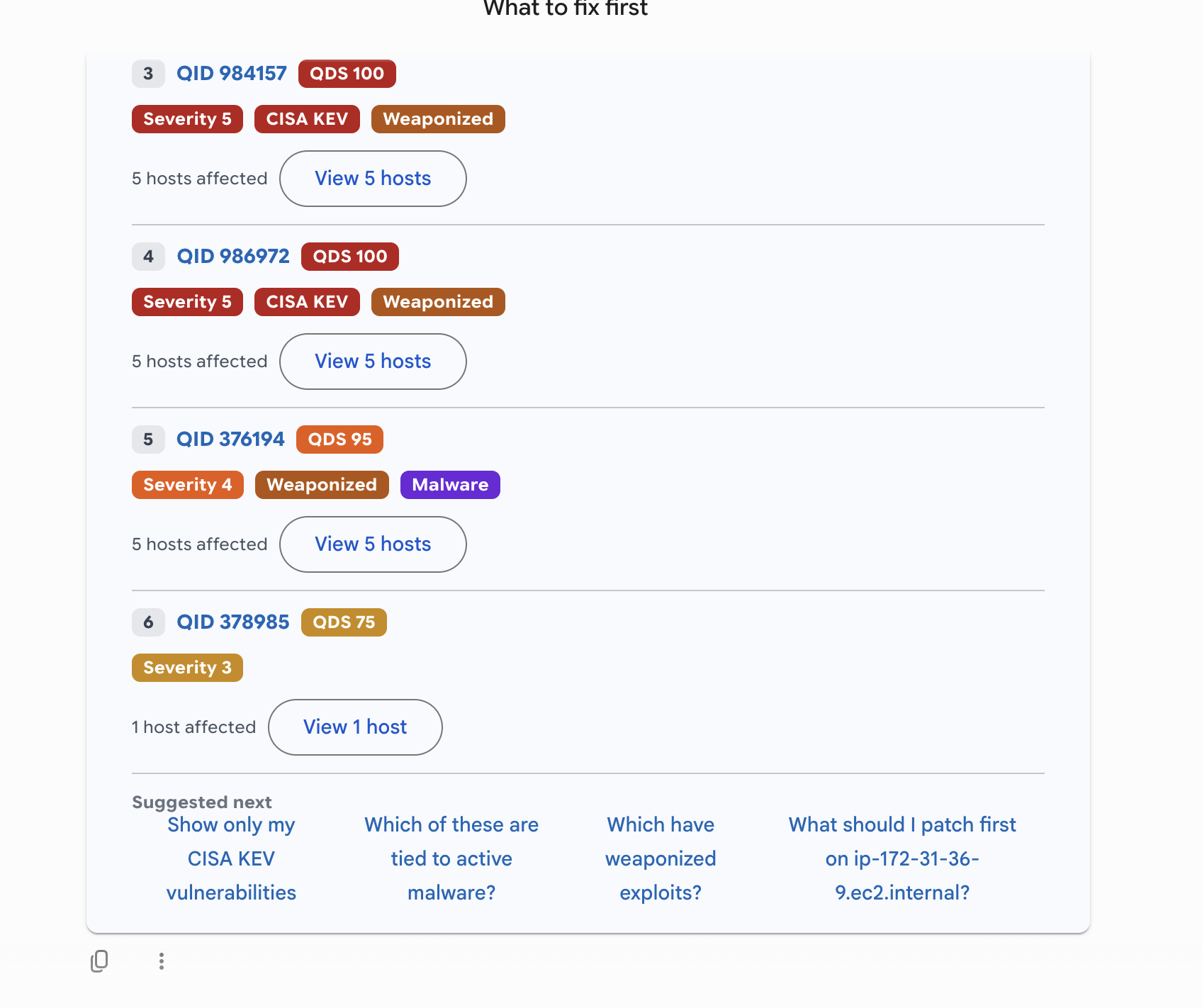
Qualys ROCky for Gemini Enterprise answering “What should we fix first?” against live Qualys data: a worklist ranked by risk, with CISA KEV, weaponized-exploit, and malware context and the affected hosts for each fix
A Day in the Life
An overdue critical patch shows up on a Windows fleet. A security lead asks the agent, “What is our exposure and what should we do?” The agent names the vulnerability, shows the affected hosts ranked by risk, and recommends the patch. The lead says, “Stage it for my Windows hosts.” The agent stages the job, shows the target set, and waits. The lead confirms, the job deploys, and a follow-up question confirms it completed. One conversation, start to finish.
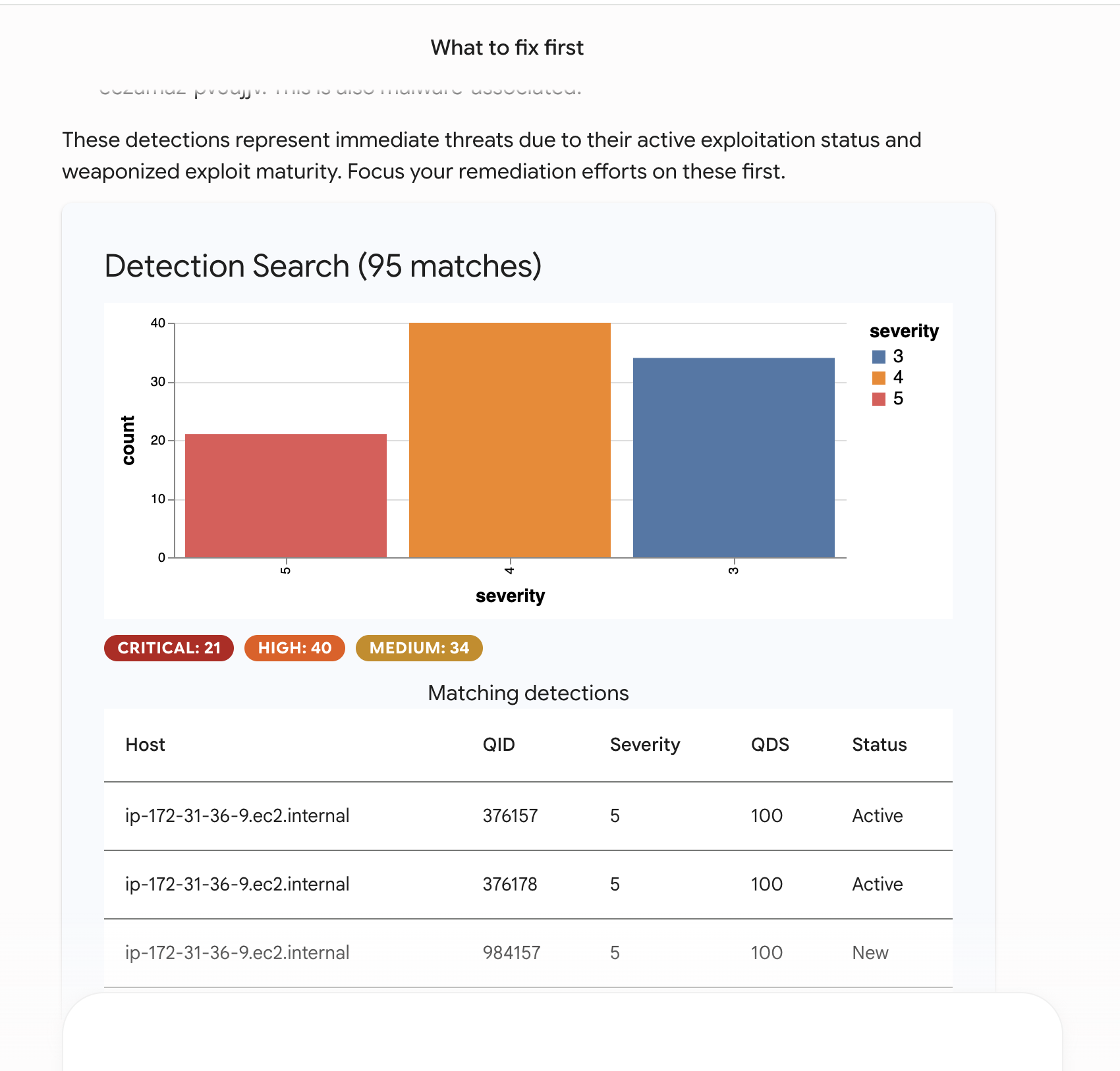
Qualys ROCky for Gemini Enterprise summarizes critical exposure against live Qualys data: open detections broken down by severity, with the affected hosts listed below.
Confirmed Before Anything Changes
An agent that can read your security data and act on your hosts has to earn trust before it earns adoption. Three principles are built in from the start.
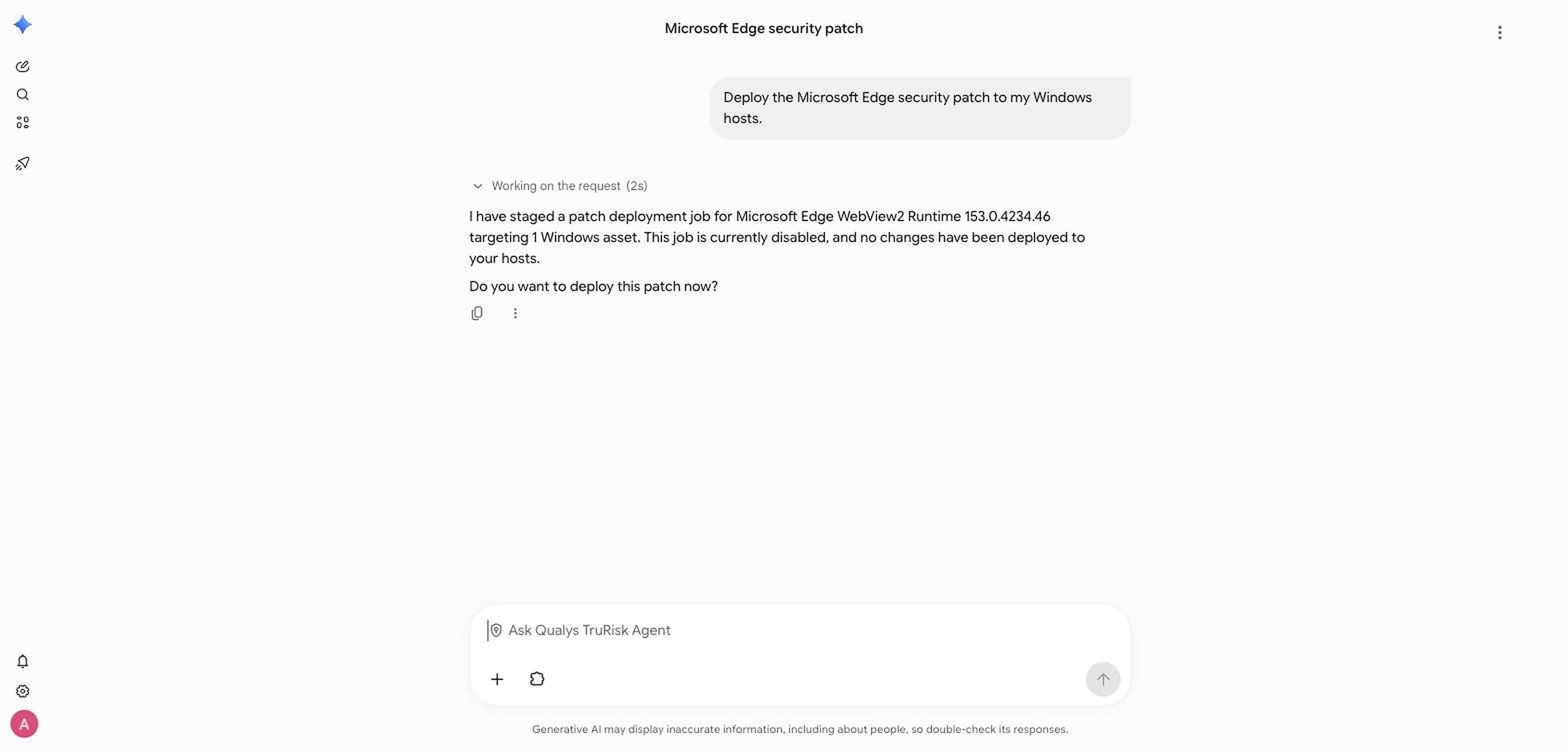
The agent stages a patch in Gemini Enterprise and stops for a decision: “This job is currently disabled, and no changes have been deployed to your hosts. Do you want to deploy this patch now?” Nothing changes a host until a person confirms.
- Every request runs under the signed-in user’s own Qualys entitlements. People see exactly what they are allowed to see in Qualys, and nothing more. The agent does not pool all users behind one shared account, and one customer’s data is never visible to another.
- Actions are confirmation-gated. The only steps that change a host are staging and deploying a patch job, and deploying always requires an explicit, single-use confirmation. The agent moves at machine speed on the reading and the ranking, and it stops for human validation on anything that changes a host.
- Your data stays in your control. Answers are computed against your Qualys subscription through the same Qualys APIs your teams already rely on. There is no separate copy of your risk data to manage.
Where It Runs
Qualys ROCky runs inside Gemini Enterprise and is available on Google Cloud Marketplace, so your teams can reach it in the environment they already work in, with the sign-in and controls your organization already manages.
“Bringing Qualys ROCky to Google Cloud Marketplace will help customers quickly deploy, manage, and grow the conversational AI assistant on Google Cloud’s trusted, global infrastructure,” said Dai Vu, Managing Director, Marketplace & ISV GTM Programs at Google Cloud. “Qualys can now securely scale and support enterprises using Qualys ROCky to manage and patch vulnerabilities through natural language queries within Gemini Enterprise.”
See It for Yourself
No team has time to fix everything. ROCky helps your team spend its hours on the risk that can actually hurt the business, and prove the program is working while it does. It brings the Qualys TruRisk platform to where your teams already work, and keeps a person in control of every change.
Qualys customers: Find Qualys ROCky on Google Cloud Marketplace, or contact your Qualys representative to see it run against your own environment.
New to Qualys? Get a complimentary trial of any of our products or use cases.